
In U.S. planning examples, a professionally installed two-to-four-camera system may fall around $600–$2,500. A larger system with concealed cable, high mounting points, local recording, network upgrades, difficult exterior routes, or advanced commissioning can reach $4,000–$10,000 or more. These are broad U.S. project bands, not a per-camera price or Canadian estimate.
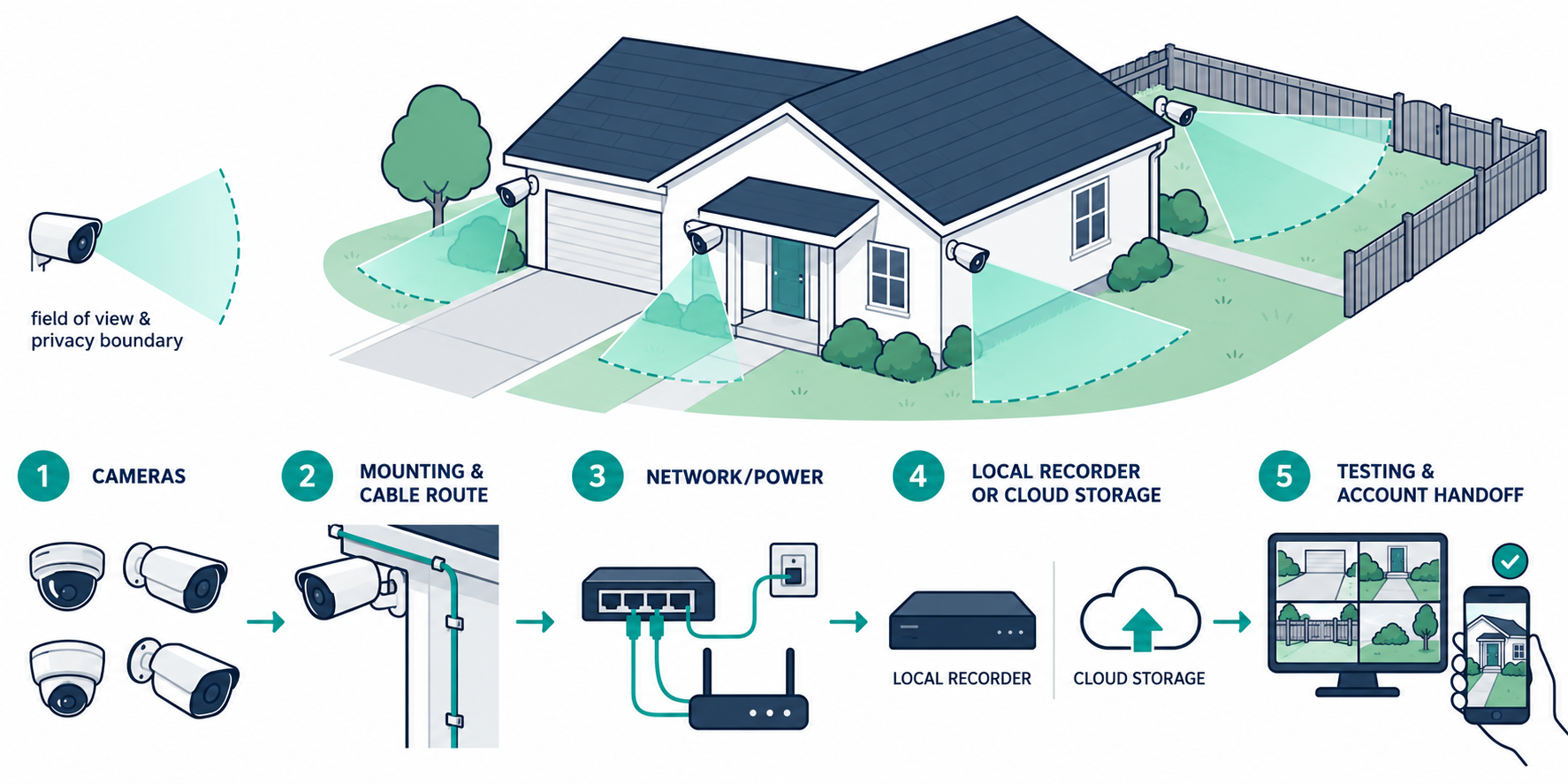
The visible camera is only one part of the job. Equipment, mounting, cabling or power, recording, network capacity, account setup, testing, and future storage or cloud service can determine the actual cost.
What a complete installation includes
A camera quote may include:
- indoor or outdoor cameras and mounts;
- Ethernet, Power over Ethernet, Wi-Fi, or wire-free equipment;
- cable, connectors, raceway, conduit, or exterior weather sealing;
- PoE switches, power supplies, access points, or network upgrades;
- a local recorder, storage drives, controller, or cloud plan;
- mounting, aiming, field-of-view adjustment, and service access;
- account setup, recording configuration, notifications, and mobile access;
- testing, documentation, owner training, and warranty handoff.
Ask whether each item is included. A four-camera package installed under an accessible eave is not comparable with four cameras at masonry walls, high gables, a detached garage, and a long driveway.
Equipment and labor
Camera equipment varies by environment, mounting, resolution, recording behavior, analytics, lighting, and manufacturer ecosystem. Outdoor locations may need equipment rated for the conditions and a sealed cable entry. A camera at a porch may use existing power or Wi-Fi; one at a remote corner may need a new cable route, a wireless link, or additional network equipment.
Labor includes more than attaching the camera. A professional may survey views, determine mounting locations, pull and terminate cable, drill and seal penetrations, install a switch or recorder, configure accounts, test recording and notifications, and document the system. High locations add setup and service difficulty. Finished walls can require fishing, selective openings, patching, or raceway.
Request equipment and labor as separate lines. A lower-cost camera may not make the project cheaper if its installation requires a new power supply, difficult access, or a separate bridge.
Cost by architecture
Architecture changes more than the camera price: it determines how the system is powered, connected, recorded, maintained, and expanded. Compare the complete installed system rather than individual cameras.
Wi-Fi and battery cameras
Wi-Fi cameras can reduce cable-pulling work, but the mounting location still needs reliable coverage. Thick walls, masonry, metal, distance, interference, and a crowded network can cause a professional to add or relocate an access point. Battery models add charging or replacement planning and may be impractical for high or difficult-to-reach mounts.
Wired Ethernet and PoE
Power over Ethernet, or PoE, can combine network data and device power over a supported Ethernet run. In one manufacturer-specific UniFi Protect example, the deployment includes a compatible console, compatible cameras, and a PoE switch. This is a concrete product architecture, not a universal bill of materials. The installer should confirm exact camera, switch, power-budget, and recorder compatibility for the selected system.
Local recording
Local recording can add a console or NVR, storage drives, a switch, a cabinet or rack location, and configuration. It may reduce dependence on a cloud-storage subscription but does not automatically remove internet, account, remote-access, or future hardware needs.
Cloud recording
Cloud plans may charge for event history, continuous recording, retention, advanced detection, sharing, or support. Include the current monthly or annual cost and the plan’s camera and retention limits. A cloud storage plan is not automatically professional alarm monitoring.
Camera count and placement
Camera count affects equipment, cable, switch capacity, storage, bandwidth, setup, and future service. Purpose matters more than a mechanical count. Define what each view is meant to show: an entry approach, door, driveway, package area, side path, common interior area, or another legitimate objective.
Ask the installer to show the proposed field of view, lighting assumptions, mounting height, cable route, and maintenance access. A high mount can improve the view or reduce casual interference but can cost more to install and service. A low mount can be easier to reach while being more exposed to impact or obstruction.
More cameras also create more footage to review and more devices to update. A quote should state whether recording is continuous, motion-triggered, or event-based, because that changes storage requirements.
Wiring and access
Finished-home installation is often governed by access rather than camera price. Attics, crawlspaces, unfinished basements, accessible soffits, and existing conduits can reduce labor. Plaster, tile, masonry, finished ceilings, fire-rated assemblies, and multi-story routes can raise it. Exterior cable entries need appropriate routing and sealing.
If a cable route cannot be concealed without substantial restoration, a surface raceway, exterior-rated pathway, Wi-Fi camera, or wireless bridge may be a reasonable alternative. The cheapest route is not always the best long-term route; serviceability, appearance, exposure, and future expansion should be included in the decision.
Bundling camera cable with Ethernet, access-point, doorbell, alarm, or other low-voltage work can reduce repeated access. Keep any line-voltage receptacle, transformer, or branch-circuit change as a separate qualified electrical scope.
Network and recording costs
The camera system uses the home network or creates part of it. A professional may need to test Wi-Fi, add a PoE switch, provide a wired uplink, improve coverage, configure a gateway, or create a suitable equipment location. Do not assume that increasing an internet plan fixes a weak internal network.
Specify the desired camera count, recording mode, retention period, remote access, and export requirements. Storage depends on camera count, activity, settings, and retention. Cloud costs can change by plan and feature. Local drives can fill, fail, or need replacement. A complete quote explains the owner’s responsibility for both.
Privacy and account ownership
Camera placement, audio recording, household privacy, neighbor views, and shared-property rules depend on location and jurisdiction. The available research does not establish a universal legal rule. Confirm the applicable requirements before deployment, especially when cameras view shared areas, tenants, employees, neighbors, or public space.
Keep the homeowner’s administrator account, recovery method, device list, model numbers, network records, and storage or cloud terms. When a system is transferred or replaced, remove old users and follow the manufacturer’s current reset and data-removal instructions.
U.S. and Canadian budgeting
For a Canadian project, request a quote from an installer serving the property’s area using the same scope: camera count, mounting heights, cable route, recorder or cloud storage, network work, and commissioning. Ask the quote to separate equipment and labor, applicable site or restoration work, configuration or testing, recurring terms, taxes, and exclusions. Do not derive a Canadian amount by converting a U.S. band.
The market evidence for installation prices is made of specialist observations with different assumptions. Treat a range as a planning tool and ask which camera count, route, access condition, storage model, and commissioning standard it represents.
What a camera quote should state
Ask for:
- camera locations, views, models, mounting heights, and environmental assumptions;
- cable or wireless path, access, sealing, raceway, and restoration assumptions;
- PoE switch, power, access-point, gateway, recorder, and storage requirements;
- recording mode, retention, cloud tier, remote access, and export method;
- programming, notification setup, testing, documentation, and owner handoff;
- account ownership, warranty, software support, and future service;
- separate pricing for line-voltage work, trenching, network changes, or physical construction.
If one bidder prices cameras only and another prices a complete commissioned system, normalize the scopes before comparing. A useful quote answers what will be installed and what the homeowner will still pay to operate, store, access, secure, and maintain it.
A useful camera design process
Start with the event or area that each camera is intended to cover. A front entry, driveway, side path, package area, and interior common area may need different mounting, lighting, and retention assumptions. Avoid adding cameras simply because a package is sold by count; each extra view adds storage, network traffic, maintenance, and future footage to review.
Have the installer mark the proposed field of view and the service path before mounting. Ask how night lighting, glare, foliage, weather, and future obstructions are handled. If a camera must be removed to replace a drive, clean a lens, or update equipment, that access should be part of the ownership plan. A documented camera schedule also helps the homeowner decide whether a lower count with better placement is more useful than a larger package.
Key points
- U.S. planning examples for modest two-to-four-camera projects fall around $600–$2,500; difficult systems can cost much more.
- Mounting access, cable or power routes, network equipment, and recording can outweigh camera hardware.
- Camera count affects storage and service, not just equipment.
- Cloud storage and professional alarm monitoring are separate services.
- Confirm account ownership, privacy requirements, equipment compatibility, and the complete installation scope before approval.
Final quote checkpoint
Before approving a camera count, mark the areas that require identification, observation, package visibility, perimeter awareness, or no coverage for privacy reasons. Ask for camera fields of view, mounting heights, lighting assumptions, cable routes, power, network capacity, recording retention, export method, and restoration. Confirm whether the proposal includes an NVR, cloud plan, storage, UPS, mobile accounts, user permissions, and testing after sunset or in expected conditions. Exterior mounting, shared-property views, audio recording, and neighbor or public-space capture can raise privacy or local-law questions. The owner should receive a camera map, account ownership, retention settings, administrator recovery method, and instructions for preserving an incident clip.