
Local recording requires more hardware at the property but can reduce or avoid a recurring cloud-storage fee. Cloud storage can reduce the amount of local recording equipment while creating an ongoing service, account, and internet dependency. A hybrid arrangement uses local storage for some footage and cloud features for selected cameras or events.
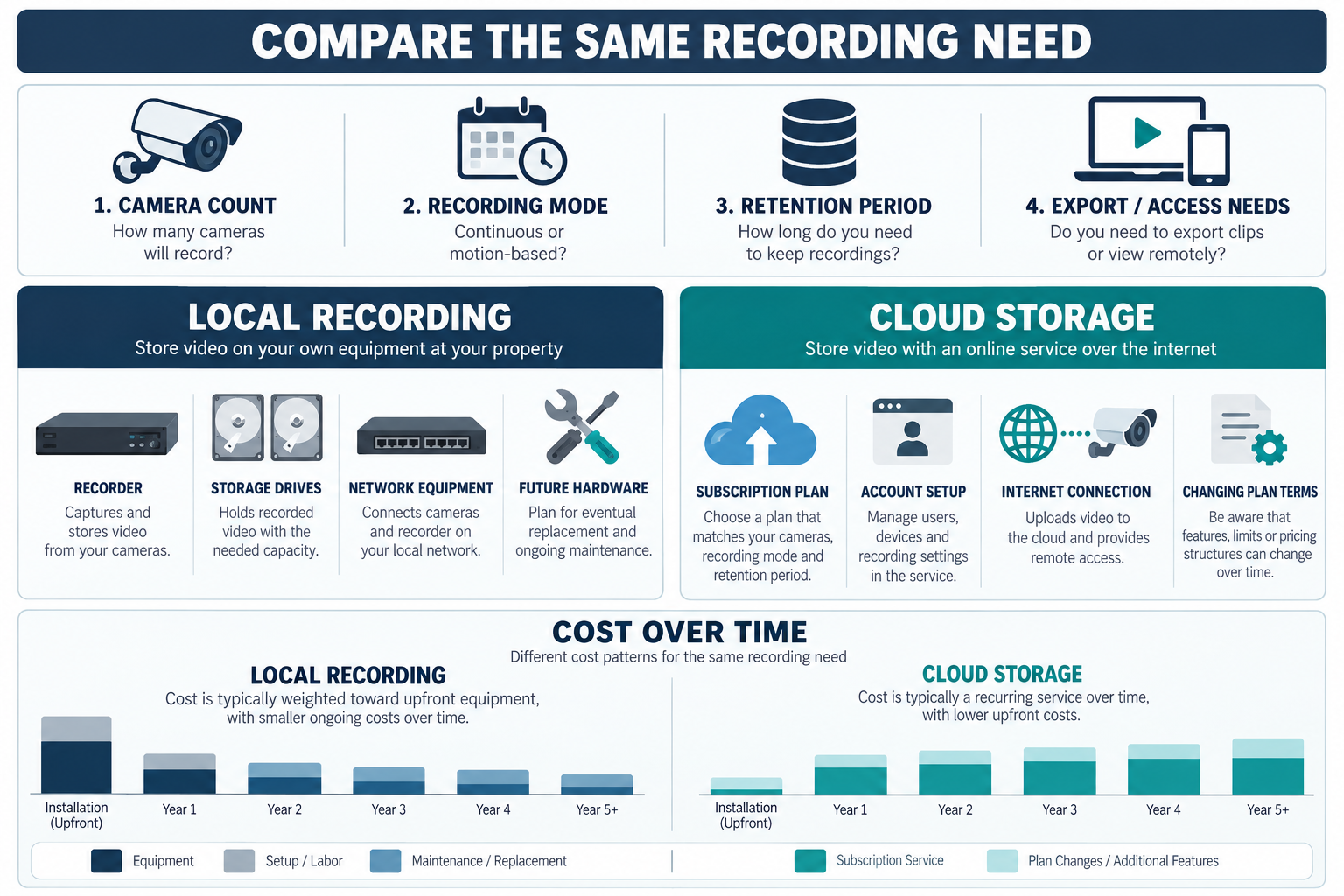
For U.S. planning, a modest local recorder and storage package may add $400–$2,000 before camera installation. A cloud plan may cost roughly $5–$50 per month, depending on camera count, retention, and features. These are broad U.S. examples, not permanent vendor pricing or Canadian estimates.
What “local” includes
Local recording is not simply “buy a hard drive.” A complete deployment may include an NVR, compatible console or controller, storage drives, cameras, a PoE switch or other network equipment, a cabinet or rack location, configuration, and a backup or replacement plan.
In one Ubiquiti example, UniFi Protect records to a UniFi OS Console such as a UNVR or Cloud Gateway Max, and the manufacturer describes local storage and no cloud backup by default in the relevant configuration. It also describes local processing for some features. These statements apply to that product family and configuration. They do not establish the storage, remote-access, retention, or privacy properties of other vendors.
Local does not necessarily mean offline. Remote viewing, notifications, updates, account recovery, support, or integrations may still depend on the internet.
A version-specific UniFi Protect retention option
For UniFi Protect 5.1 and later, Ubiquiti documents an Enhanced Retention option that keeps selected recordings at high quality for a configured period, then downgrades older footage to low quality before later deletion under the configured retention settings. Ubiquiti says downgraded footage cannot be restored to high quality and retention-setting changes apply to new recordings. This is product- and version-specific behavior; confirm the current guidance for the installed release before estimating storage or comparing it with another recorder.
What cloud storage includes
Cloud services may charge for event history, continuous recording, retention, person or package detection, sharing, downloads, or support. The camera may still need a local network, internet, power, and a compatible app. A cloud-storage plan does not necessarily include professional intrusion monitoring.
Write down the current plan’s camera limit, retention period, recording mode, download rules, account ownership, cancellation result, and price after any promotion. Provider features and terms can change after installation. Keep the model numbers and the plan terms with the handoff documentation.
Dated Canadian cloud-plan example
Ring’s Canada storefront, accessed October 11, 2026, listed Solo at CA$5.99 per month or CA$59.99 per year for one doorbell or camera; Multi at CA$14.99 per month or CA$149.99 per year for all devices at one location; and Pro at CA$29.99 per month or CA$299.99 per year for all devices at one location. Applicable taxes are extra. Ring advertises video history of up to 180 days, subject to its terms and eligible devices. Pro also includes professional monitoring, which Ring says is available in Canada except Quebec; local permit, false-alarm, or verified-guard-response fees may apply. Pro is not a storage-only comparison. These are subscription prices, not a local-recorder installation price or a market-wide savings estimate.
Cost components to compare
| Cost category | Local recording | Cloud storage |
|---|---|---|
| Upfront equipment | Recorder or console, drives, switch, cabinet, and network additions | Camera, hub or bridge, and any required local equipment |
| Installation | Mounting, cable or Wi-Fi, recorder setup, storage configuration | Mounting, cable or Wi-Fi, account and app setup |
| Recurring fee | Often lower, but support or remote services may remain | Monthly or annual storage and feature plan |
| Retention | Determined by drive size, camera count, bitrate, and recording mode | Determined by subscription tier and provider rules |
| Replacement | Drives, recorder, switch, controller, or camera | Camera, hub, account, or service-plan changes |
| Internet dependence | Often needed for remote access, alerts, updates, or support | Usually important for upload, alerts, and remote viewing |
The comparison is only useful when the two options provide the same recording mode and retention objective. An inexpensive event-only cloud tier is not equivalent to a local system recording continuously for several weeks.
Five-year ownership framing
Use this model:
installation + equipment + monthly fee × 60 + storage or replacement + support
For an illustrative U.S.-dollar comparison, a local system that adds $1,400 upfront and $250 of storage or service over five years totals about $1,650 beyond the cameras. A cloud plan at $25 per month adds $1,500 over five years before price changes, equipment, or installation. A $40 plan adds $2,400. This arithmetic is not a market quote; use the current plan and actual retention requirement.
Run the same calculation using the property’s local quotes and currency. These arithmetic examples use U.S. dollars only and are not Canadian market observations. For a Canadian project, compare the same camera count and retention period, and ask local providers to separate recorder and drives, installation, cloud terms, replacement, and support. Do not convert a U.S. example by exchange rate.
The cheaper total is not automatically better. Local systems may require the owner or a technician to replace drives, diagnose the recorder, manage local access, and protect the equipment. Cloud systems can be simpler to manage while exposing the owner to recurring price, policy, account, and service-availability changes.
Camera count and retention
More cameras increase storage demand, network traffic, subscription tiers, and the number of devices that need updates. Continuous recording uses more local capacity than event recording, while event detection depends on the product and settings. Longer retention can be useful at an infrequently occupied property but excessive for an interior view with little activity.
Ask the installer to model the requested camera count and retention rather than quote a generic NVR package. Ask what happens when the drive is full, whether footage is overwritten, how files are exported, and what warning appears when storage is unhealthy. For cloud plans, ask whether the provider stores continuous footage, events only, or a selectable mix.
Storage is also an ownership decision for the homeowner. Footage has value only if it can be found, exported, viewed, and retained under a clear account. A low monthly fee may not be useful if the needed event has already aged out.
Remote access and ownership
Confirm who controls the administrator account, recovery method, devices, recordings, and export process. When a system changes hands, remove old users and follow the current manufacturer reset and data-removal instructions. Canadian consumer guidance recommends considering privacy, security, expected service life, offline operation, and factory reset before disposal or transfer. U.S. consumer guidance similarly emphasizes credentials, updates, unused features, and obsolete devices.
“Local” does not promise privacy or security by itself. The network, passwords, firmware, physical access, remote service, and account configuration still matter. “Cloud” does not explain every processing or storage behavior without reading the provider’s current documentation. Keep these distinctions visible in the quote.
Hybrid arrangements
A hybrid system may record locally while using cloud backup, remote access, event sharing, or selected cloud analytics. It can provide resilience or convenience, but it can also create two service models and two account dependencies. Price the local recorder, drive, cloud plan, retention, upload requirement, and failure behavior together.
Do not assume that a product described as local has no cloud features or that a product with cloud access stores every feature remotely. For model-specific behavior, use the current manufacturer documentation for the selected equipment.
When local recording tends to fit
Local recording may fit a homeowner who wants predictable long-term storage cost, a defined retention period, direct control of equipment, or a property with a capable network and accessible equipment location. It can be attractive when the cameras are numerous enough that subscription tiers would compound.
The tradeoff is responsibility for drives, recorder, network, exports, updates, backups, and physical security. Include a replacement reserve. A local recorder can also become a single point of failure unless the design and storage approach address it.
When cloud storage tends to fit
Cloud storage may fit a homeowner who values lower local hardware complexity, managed access, remote availability, or a simple setup. The tradeoff is a recurring fee, internet dependence, provider account, changing features, and the possibility that cancellation affects retention or remote access.
Ask whether the service stores only event clips or continuous footage, how long clips remain available, whether the homeowner can export them, and how the price changes with added cameras. Do not rely on a promotional first-year price for a multi-year decision.
Questions before choosing
Ask:
- What camera count, recording mode, and retention period does the price assume?
- What hardware must be purchased locally?
- What service is paid monthly or annually?
- What happens during an internet or power outage?
- Who owns the administrator account and recordings?
- How are recordings exported, overwritten, or deleted?
- What does cancellation remove?
- What happens when drives, recorders, cameras, or hubs reach end of support?
- Which features depend on a cloud account even in a local-recording design?
- What equipment and service costs should be reserved over five years?
A fair storage comparison
Before calculating, choose the actual recording objective: event clips, continuous recording, a short retention window, or a longer period for a vacant property. Then use the same camera count and retention for local and cloud options. A low cloud tier with a few days of event history should not be compared with a local recorder sized for continuous recording.
Also price the homeowner’s time and failure response. Local storage may save a monthly bill but require drive health checks, exports, account recovery, and replacement hardware. Cloud storage may simplify access but require a recurring provider relationship and a working internet path. If recordings matter for insurance, a dispute, or a remote property, ask how footage is preserved when the camera, network, recorder, or account fails.
Key points
- Local recording shifts cost toward upfront equipment and future maintenance.
- Cloud storage shifts cost toward recurring service, account, and internet dependence.
- Camera count, retention, recording mode, and export requirements determine a meaningful comparison.
- A manufacturer-specific local-storage example does not define every vendor’s architecture.
- Compare the total cost and ownership responsibility over a defined horizon in the correct local currency.