
Alarm repair is usually a diagnostic service first and a parts purchase second. A technician may need to determine whether the problem is a sensor, cable, power supply, backup battery, keypad, panel, communicator, network path, account, or configuration. A homeowner who approves a replacement before the fault is understood can pay for a new system when a smaller repair would have restored service—or spend repeatedly on parts that cannot solve an obsolete-system problem.
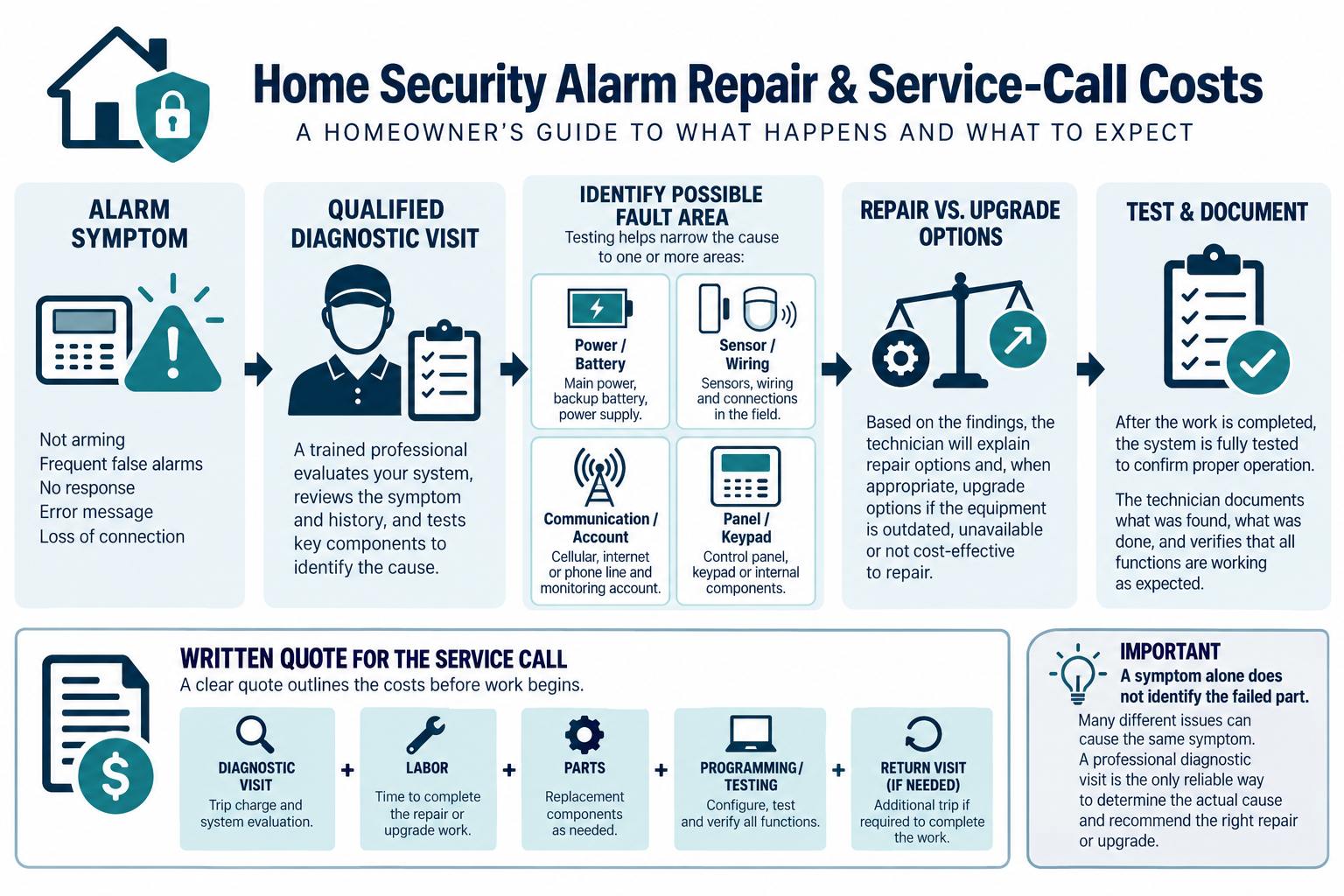
In U.S. examples, a basic service visit may fall around $100–$300 before parts and extended troubleshooting. A sensor, battery, keypad, communicator, wiring, or programming repair can bring the visit to roughly $200–$1,200. Multiple faults or obsolete equipment may be better treated as an upgrade or replacement; local service models vary widely.
Common reasons an alarm needs service
Typical symptoms include:
- a persistent open-zone or tamper message;
- false alarms or repeated nuisance signals;
- a keypad that is blank or unresponsive;
- a system that loses communication;
- a dead or weak backup battery;
- one door, window, or motion sensor that does not report;
- damaged cable after remodeling, pests, moisture, or impact;
- an app or user account that no longer connects;
- a siren or auxiliary device that does not behave as expected;
- a legacy panel that cannot use the desired current service.
The symptom does not identify the failed component. A “communication failure” might be an account, network, cellular, power, or hardware issue. A “bad sensor” might be a damaged cable or a loose termination. Price the diagnostic step honestly.
What a service call may include
The first visit can include arrival and travel, review of the system history, visual inspection, power and battery checks, zone testing, cable or termination checks, communicator and network assessment, configuration review, and a written recommendation. Some companies charge a minimum service period; others price a diagnostic fee and then apply labor toward an approved repair.
Ask what happens if the technician cannot complete the repair during the first visit. The total may include a second visit, ordered parts, programming, return testing, or a monitoring-provider coordination charge. A service plan may waive some visits or batteries, but it may also restrict who can service the equipment.
Common repair categories
The category of failure affects both the diagnostic time and the likely repair scope. Ask the technician to identify the failed part or condition before approving replacement equipment.
Batteries and power
Backup batteries and power supplies are common service items. The correct replacement depends on the equipment and system design. A new battery may not solve a problem caused by a failing charger, loose power connection, or panel fault. Ask whether the technician will verify charging and test the system after replacement.
Sensors and contacts
Door and window contacts, motion sensors, glass-break sensors, and environmental sensors can fail mechanically, electrically, or because their cable or mounting has changed. Replacement cost includes the device, access, installation, programming, and testing—not just the retail sensor.
Keypads and user interfaces
A keypad repair can be small when the issue is power, mounting, or a connection. It can be more involved when the replacement must match an older panel or when the system has multiple keypads and partitions. Confirm whether a proposed keypad is compatible with the panel and whether the homeowner will retain existing users and settings.
Wiring and terminations
Remodeling, water, pests, fasteners, and accidental cuts can damage low-voltage wiring. Finding the break may take longer than installing a replacement device. An accessible termination may be inexpensive to correct; an inaccessible cable route may justify a wireless or new-route alternative.
Communication faults
Remote app, cellular, or monitoring failures can originate outside the alarm devices. The technician may need to check account status, signal, communicator support, internet, router changes, or provider service. Do not treat a new communicator as the default fix without identifying the current failure and the supported replacement path.
Panel and software problems
A panel can still arm while becoming difficult to service or integrate. If replacement parts, firmware, cellular service, or programming support are no longer available, repair may only postpone a larger decision. Ask what support remains and what a future repair would cost.
Repair versus replacement economics
Repair tends to make sense when the system is supported, the fault is isolated, existing zones are documented, and the repaired system still meets the homeowner’s coverage and communication needs. It is also sensible when the repair is a low-cost service item and the equipment has substantial useful life remaining.
Upgrade or replacement becomes more reasonable when several zones fail, the panel or communicator is obsolete, the system is proprietary, documentation is absent, service visits repeat, or the desired app, monitoring, and integration features cannot be added. The decision should include assessment labor, recurring fees, future batteries, and the value of a supported system.
Do not use a fixed percentage of replacement cost as the only rule. In a U.S.-dollar illustration, a $400 repair on a supported system may be reasonable; the same amount spent diagnosing an unsupported system may be poor value. Compare the expected cost of another failure and the cost of moving to a documented replacement.
A practical diagnostic budget
Before authorizing work, ask the company to separate:
- minimum visit or diagnostic charge;
- hourly labor after the included time;
- parts and equipment;
- programming and testing;
- return visit and shipping;
- monitoring-provider coordination;
- emergency or after-hours premium;
- proposed upgrade alternative.
Give the technician the symptoms, when they began, recent remodeling or power events, and any system documentation. This can reduce time spent rediscovering the installation. Keep the alarm account and equipment history available, but do not attempt unsafe bypasses or panel changes to make the symptom disappear.
Service plans and provider dependence
A monitoring company may offer repair, battery, or support plans. Read what the plan covers, whether parts are included, how quickly service is available, and whether the provider owns or controls the equipment. A low monthly service fee may exclude wiring, obsolete components, camera equipment, or after-hours work.
If the system is being transferred to a new owner, ask which accounts, credentials, codes, warranties, and monitoring obligations move with the property. An account problem can look like a hardware problem when an owner cannot access the correct portal or provider record.
Safety and security boundaries
This guide does not provide instructions for disabling, bypassing, or rewiring security or life-safety equipment. A persistent alarm message may be inconvenient, but silencing the symptom without correcting the cause can reduce protection. Have qualified personnel test the system after work and document the result.
Where an alarm is integrated with smoke/CO monitoring, controlled entry, water shutoff, or another consequential system, the repair scope needs product-specific verification. Do not assume that a technician who can repair a basic intrusion zone is also responsible for every connected subsystem.
What to ask before approving repair
Ask:
- What did the diagnostic establish, and what remains uncertain?
- Is the proposed part compatible with the actual panel and service?
- Is the problem isolated or evidence of an obsolete system?
- Does the price include programming, testing, and a return visit?
- What happens if the cable or another zone fails?
- What warranty applies to labor and parts?
- What would an upgrade cost, and what existing infrastructure could it reuse?
- Who owns the equipment and service account?
Request a written repair result with replaced parts, affected zones, test results, and any remaining limitations. This record can lower the cost of the next service call and help compare repair with replacement later.
U.S. and Canadian cost boundaries
For a Canadian project, request a service estimate from technicians who service the existing alarm system, using the same scope: the diagnostic visit, included labor time, parts, extended troubleshooting, and the point at which replacement is recommended. Ask for an itemized price covering relevant equipment, labor or service, site or access work, setup or testing, recurring terms, taxes, and exclusions. Do not derive a Canadian amount by converting a U.S. band.
Because published repair data is thinner than installation data, local quotes should be treated as more informative than a single online average. Ask for the work assumptions behind the price.
Key points
- Most alarm repairs begin with diagnosis, not a guaranteed replacement part.
- Batteries, sensors, wiring, communication, keypads, and panels have different cost paths.
- Obsolete or proprietary equipment can make repeated repair poor value.
- Never approve a repair quote that leaves the diagnostic scope and return-visit rules unclear.
- Have qualified personnel test and document the system after repair; do not bypass protection to hide a fault.
Final quote checkpoint
Before authorizing a repair, ask whether the technician will diagnose the fault before replacing a panel, communicator, sensor, battery, or keypad. The service record should identify zones tested, event history reviewed, power and signal checks, intermittent symptoms, and any component that could not be verified. Confirm whether the repair restores local alarm behavior, remote notification, professional monitoring, or only one layer. Ask for a written distinction between repair, replacement, reprogramming, and a future upgrade. Keep the homeowner account, installer credentials, monitoring contract, zone list, and final test results together. If a recurring false alarm affects dispatch or neighbors, follow the local provider or authority process while the underlying fault is investigated.