
PoE cameras use Ethernet cabling to carry network data and, in supported installations, power. Wi-Fi cameras use a wireless network for data and still need power, a battery, or a local adapter. Wire-free cameras reduce cable work further but make battery access and maintenance part of the ownership decision.
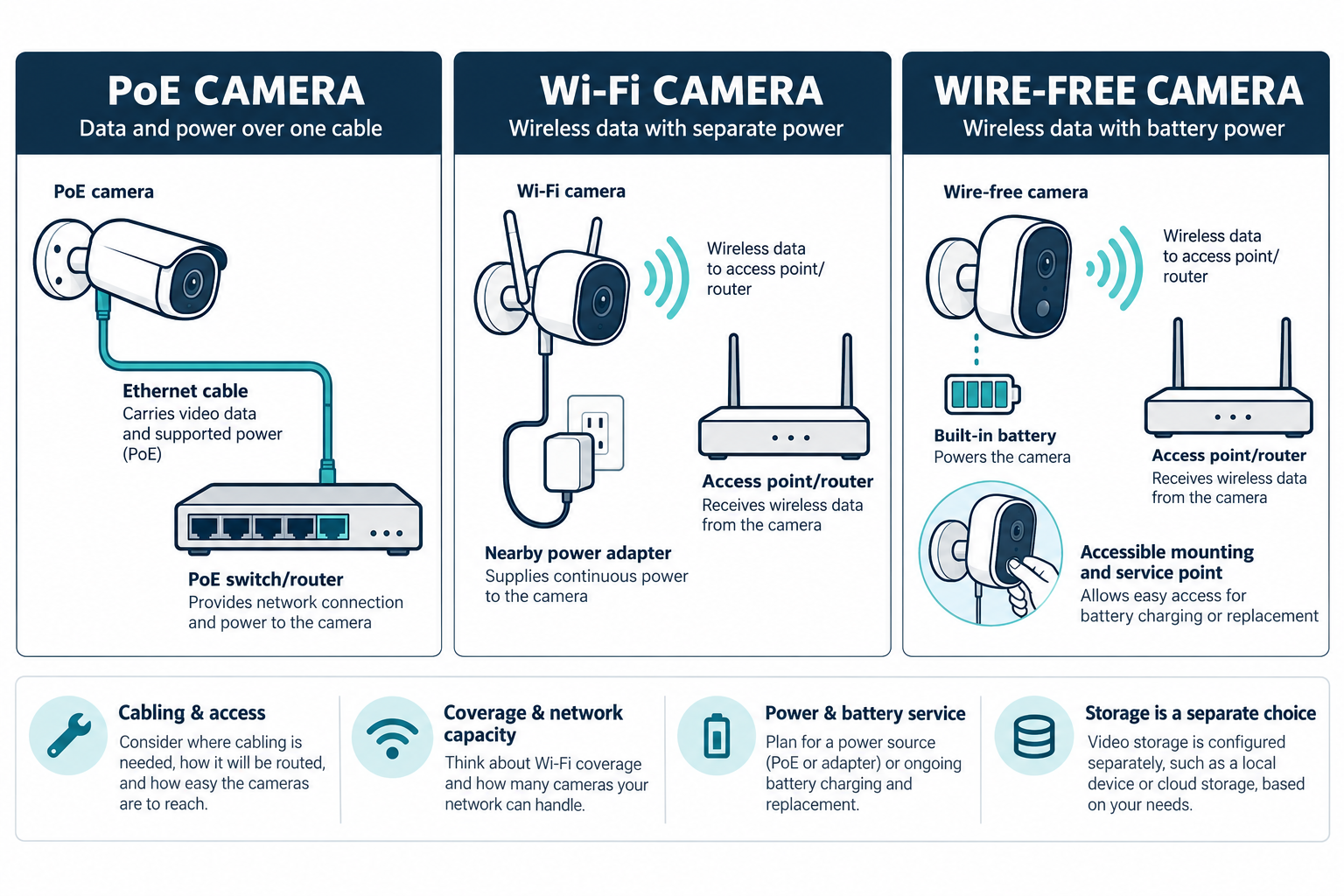
For a small U.S. project, a Wi-Fi or wire-free setup may be roughly $300–$1,500 before major network work. A professionally cabled PoE system may be about $1,200–$4,500 for several cameras, with large or difficult properties going higher. Compare the whole infrastructure, not the price of one camera.
Compare the architectures
| Question | PoE or wired Ethernet | Wi-Fi or wire-free |
|---|---|---|
| Data path | Dedicated cable to a switch or network device | Shared radio path to an access point or router |
| Power | PoE or separate power, depending on equipment | Outlet, adapter, or battery |
| Installation labor | Cable route, terminations, switch, mounting, and testing | Placement, coverage testing, setup, and possible power work |
| Recording | May pair with a local recorder, cloud, or hybrid | Product-specific local, cloud, or hybrid recording |
| Maintenance | Cable, switch, storage, and device service | Battery, power, radio, account, and device service |
| Expansion | Spare pathways and switch capacity help | Radio capacity, coverage, and compatible devices matter |
The table describes cost tendencies, not guarantees. A product family may use a different controller, switch, licensing model, or power requirement from another. Confirm the actual installation documents.
What PoE adds
PoE can reduce the number of separate power connections at supported camera locations. In a manufacturer-specific UniFi Protect example, a compatible PoE switch provides both camera power and network connectivity, while a compatible console hosts the application. This shows the equipment relationship behind one PoE system; it does not establish that every PoE camera uses the same console or switch.
The cable itself is rarely the whole premium. A finished-home installation may involve attic or crawlspace access, wall fishing, exterior drilling and sealing, terminations, labeling, testing, switch capacity, and finish restoration. A long route or high camera can cost more in labor than the camera hardware.
PoE can become more economical when a new build, gut renovation, rack, or existing pathway makes cable access straightforward. It can also reduce the marginal cost of future cameras if spare runs, switch ports, and power budget were planned. Those future benefits only exist when the infrastructure is documented and remains compatible.
What Wi-Fi adds
Wi-Fi avoids some cable-pulling work but needs a usable radio path at the final camera location. Walls, floors, masonry, metal, exterior distance, interference, and network congestion can change performance. A professional may need to move an access point, add a wired backhaul, improve the gateway, or perform a site survey.
Battery cameras add a second question: can the homeowner reach the device safely and often enough to replace or charge the battery? High eaves, remote corners, seasonal homes, and cameras exposed to cold or weather can make routine service more expensive than the initial installation saving.
Wi-Fi cameras also need power unless they are truly battery-operated. A new receptacle, transformer, or branch-circuit change is not part of the low-voltage camera decision and should be priced separately by the appropriate qualified trade.
Installation and access economics
For a finished home, compare three paths rather than assuming the answer is only PoE or Wi-Fi:
- concealed Ethernet with wall or ceiling access;
- surface raceway or selectively accessible Ethernet;
- Wi-Fi or wire-free equipment with verified coverage and power.
Raceway may be less visually discreet but less expensive and easier to service than repeated patching. Concealed cable may cost more now but offer a cleaner documented path and easier future expansion. Wireless may be the most economical where access is disproportionately difficult, but only if signal and battery assumptions are sound.
Bundling camera runs with Ethernet, wired access points, doorbell, alarm, or other low-voltage work can lower repeated access labor. Do not bundle unrelated physical gate work, trenching, or line-voltage work without showing their separate assumptions.
Network and storage implications
PoE does not decide whether the system records locally or in the cloud. A PoE system may use an NVR, console, cloud service, or hybrid. Wi-Fi systems may do the same. Compare camera count, recording mode, retention, remote access, storage, and export requirements independently of the data path.
PoE cameras require switch capacity and an adequate power budget. The exact requirement is model-specific. Wi-Fi cameras require radio coverage and network capacity. A weak internal network may not be fixed by buying a faster internet plan. Include gateways, access points, switches, recorder, storage, and configuration in the project total where needed.
Cloud storage can reduce local recording hardware while adding a recurring fee. Local storage can reduce some subscription costs while creating drives, recorder, account, and replacement responsibilities. A camera architecture quote should state those ownership costs.
Reliability and security are not automatic conclusions
It is too broad to say wired cameras are always reliable or Wi-Fi cameras are always insecure. Cable quality, switch power, radio conditions, credentials, firmware, account controls, weather, device support, and installation quality all matter. A wired system can fail at a cable termination or switch; a wireless system can fail at the power, radio, account, or network layer.
Use the selected manufacturer’s current setup and security guidance. Keep the homeowner’s administrator account, use supported updates, and document which services are needed for remote access. Do not turn a cost comparison into a promise about privacy, availability, or intrusion resistance that the evidence does not establish.
Expansion and serviceability
Ask whether the design leaves spare switch ports, PoE capacity, rack space, pathways, and network addressing. A wireless system may need additional access-point capacity as cameras and other connected devices are added. More cameras also increase storage and the number of devices requiring updates.
Serviceability matters when a camera is mounted high, placed outdoors, or tied to a proprietary recorder. Ask who will replace a drive, troubleshoot an offline camera, restore a lost account, or service a battery. A lower upfront price can lose its advantage if every future problem requires a specialized visit.
Which homes favor each approach?
PoE tends to fit a new build, major renovation, large property, many fixed camera views, planned rack, or homeowner who values a documented cable infrastructure. Wi-Fi can fit a modest finished home where final mounting points have reliable coverage and accessible power. Wire-free can fit a location where cable access is disproportionately expensive, provided battery and connectivity service are acceptable.
Hybrid approaches are common. A homeowner may use PoE for fixed outdoor views and Wi-Fi or battery devices where cable access is difficult. Price the network, storage, and service model for each group rather than assuming one architecture must serve every location.
How to compare quotes
Ask two or more bidders to use the same camera count, field of view, mounting height, recording mode, retention, and commissioning standard. Require:
- the cable or wireless path to each location;
- PoE switch model and power budget, or Wi-Fi coverage assumptions;
- power and battery responsibility;
- recorder, storage, cloud, and remote-access costs;
- testing, documentation, account handoff, and warranty;
- future expansion capacity and service rates.
If a quote is based on untested coverage or assumed existing wiring, treat the price as conditional. Ask what happens when the final camera location does not pass the signal test or an expected cable route is inaccessible.
U.S. and Canadian budgeting
For a Canadian project, request a quote from an installer serving the property’s area using the same scope: camera coverage, power and cabling, network work, storage, configuration, and testing. Ask the quote to separate equipment and labor, applicable site or restoration work, configuration or testing, recurring terms, taxes, and exclusions. Do not derive a Canadian amount by converting a U.S. band.
The most economical choice is the system that delivers the required views with a network, power, storage, and maintenance plan the homeowner can support. The lowest camera price is only one part of that decision.
A practical comparison method
Describe the required views first, then price each architecture against those views. For every location, record mounting height, power, network path, recording mode, retention, and service access. This prevents a wireless quote from assuming a nearby indoor router while a PoE quote includes difficult exterior cable work.
Consider the next five years as well as installation day. A wire-free camera may need several battery visits, while a PoE system may need a switch replacement or a service visit at the rack. A Wi-Fi system may need an access-point upgrade as the household grows. A wired system may be easier to expand only if spare pathways, switch ports, and documentation were included. The most useful estimate makes those future obligations visible.
Key points
- PoE trades cable and switch infrastructure for a predictable wired path; Wi-Fi trades much of that cable work for radio and power planning.
- Wire-free cameras reduce installation labor but add battery and access obligations.
- Local or cloud recording is a separate choice from PoE or Wi-Fi.
- Performance and security depend on the actual product and network design.
- Normalize views, retention, network assumptions, and commissioning before comparing quotes.