
In U.S. planning examples, residential Ethernet wiring may cost about $150–$400 per drop for straightforward accessible work. A small project may total $400–$1,500, while a whole-home installation with many outlets, finished-wall access, a central panel, testing, and restoration can reach $2,000–$8,000.
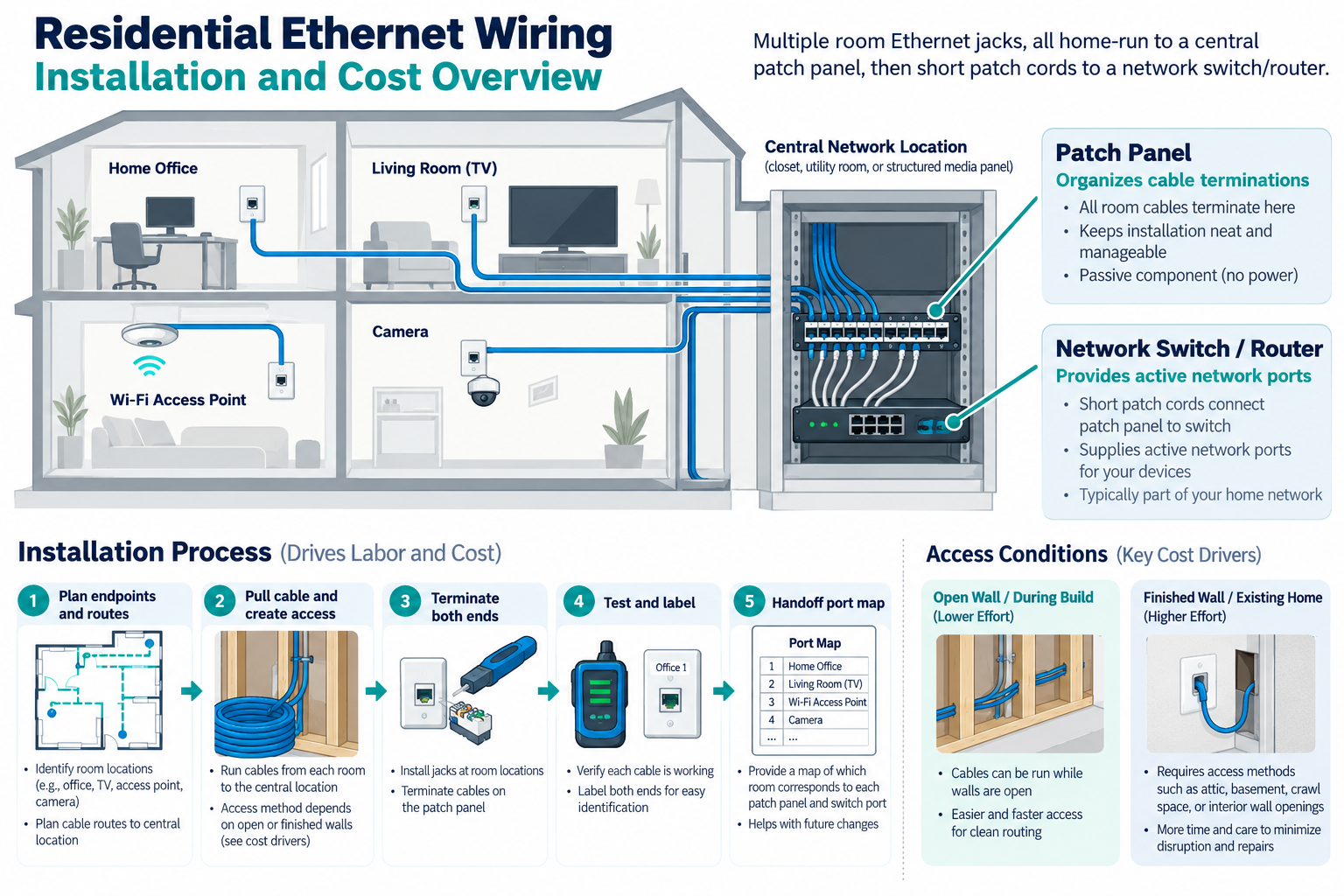
These are broad planning bands because “one Ethernet drop” can mean very different work. A cable in an open wall with an unfinished basement route is not comparable with a concealed run through plaster and several floors. Cable, terminations, patching, a patch panel, switch capacity, and documentation all belong in the project scope.
What an Ethernet installation includes
A complete installation may include:
- twisted-pair Ethernet cable and pathway;
- wall plates, jacks, and boxes;
- cable pulling, routing, support, and firestopping where applicable;
- terminations at the room and central location;
- patch panel or structured media enclosure;
- switch ports and network connection;
- labeling, continuity or qualification testing, and a port map;
- wall, ceiling, or surface restoration.
The cable category is only one choice. The installer should specify the cable type, environment, route, termination hardware, and test standard appropriate to the project. Do not pay for a higher category merely because the label sounds faster; a suitable, well-installed and documented path may provide more value than a premium cable with poor access or terminations.
Typical project sizes
Project size is best measured by the number and location of usable drops, not by cable length alone. A small number of difficult routes can cost more than several accessible runs installed together.
One or two rooms
A small project may reuse an accessible basement, attic, or closet route. Labor, termination, testing, and the central connection can be a larger share than cable material. Ask whether the quote includes a switch or assumes an existing open port.
Several drops
Multiple runs can justify a central patch panel and make setup more efficient. The installer can plan routes together, reducing repeated access. The number of ports and the distance to the central location still determine labor.
Whole-home structured wiring
A whole-home project may involve each bedroom, office, living area, access-point location, camera location, doorbell, or outbuilding. It may become a new-construction prewire or a finished-home retrofit, each with different economics. Keep network drops, camera, alarm, and automation paths visible even when they share a central location.
Main cost drivers
The price usually changes with:
- number of runs and terminations;
- cable length and route complexity;
- open-wall, attic, crawlspace, or finished-wall access;
- wall material, masonry, floors, and ceiling restoration;
- central panel or rack location;
- cable type, pathway, conduit, and exterior exposure;
- patch panel, switch, power, and network configuration;
- testing, labeling, mapping, and documentation;
- travel, building shape, and local labor.
Published per-port figures vary because some include only cable and jacks, while others include design, testing, patch panel, switch, and finish repair. Normalize the scope before comparing.
Cable and termination costs
Material includes cable, jacks, wall plates, boxes, patch-panel modules, connectors, supports, and sometimes conduit or surface raceway. A central termination point may need an enclosure or rack. If the project includes cameras or access points, a switch may need suitable PoE capacity; if it includes only computers, ordinary data switching may be enough.
Good terminations and labels have economic value. A failed connection can be expensive to diagnose when the cable path is concealed. Request a port map that identifies each room jack and its central termination, plus the test result and any run that was not tested.
Do not assume that a visible cable end is a usable network port. The installer may need to find the other end, remove an abandoned splice, reterminate it, or route it to the central location.
Labor and wall access
In a finished home, cable fishing and finish repair often cost more than the cable. Attics, crawlspaces, unfinished basements, closets, and open chases can lower labor. Plaster, tile, masonry, spray foam, fire-rated assemblies, multi-story routes, and inaccessible cavities can raise it.
Surface raceway may cost less than concealed fishing and make future service easier. A new opening may be small but still require patching and paint. Ask whether restoration is included, excluded, or priced by another contractor. Bundling several low-voltage runs during one access visit can reduce repeated disruption.
The guide does not define statutory inspection or licensing rules. Local requirements vary; verify them with the qualified installer and authority when the work crosses a relevant boundary.
Patch panels, switches, and central equipment
A central termination point improves organization when it is accessible, labeled, ventilated, and large enough for future additions. A patch panel does not replace a network switch. The switch provides the active network ports; the patch panel organizes cable terminations.
Ask whether the quote includes the switch, rack or panel, cable management, power, and network configuration. A new receptacle or branch circuit belongs in a separate electrical scope. Equipment installed in a cramped, hot, or inaccessible space may create future service cost even if the initial cabling is sound.
New construction versus retrofit
Open-wall prewire usually lowers access labor and makes it easier to plan multiple systems, spare pathways, a central rack, and documentation. Finished-home retrofit can be worthwhile when the performance or serviceability benefit justifies fishing, patching, raceway, or selective openings.
If the owner only needs one connection, compare Ethernet with a well-designed wireless or coax-reuse solution. If the owner is already renovating, additional prewire may be economical while walls are open. The separate prewire and retrofit guides address those project phases in more detail.
Testing and documentation
Testing can range from continuity and pinout checks to a qualification or certification test appropriate to the cable and installation. Ask what test is included and what deliverable will be provided. A basic “it links” check is not necessarily the same as a formal cable certification.
Documentation may include room labels, jack numbers, patch-panel map, cable routes, switch ports, test results, and photos before finishes close. It can lower future troubleshooting cost and make a home more attractive to a later owner or installer.
U.S. and Canadian budgeting
For a Canadian project, request a quote from an installer serving the property’s area using the same scope: drop count, cable and route, access, terminations, labeling, testing, and wall restoration. Ask the quote to separate equipment and labor, applicable site or restoration work, configuration or testing, recurring terms, taxes, and exclusions. Do not derive a Canadian amount by converting a U.S. band.
Technical cable-performance or installation-limit claims should come from standards or authoritative technical material. A cost guide can explain the project structure without promising a specific speed or distance for every cable and network.
What a quote should include
Ask for:
- a room-by-room drop schedule;
- cable type and pathway assumptions;
- access, wall openings, raceway, firestopping, and restoration;
- jack, plate, patch-panel, enclosure, and switch scope;
- PoE requirements when cameras or access points are included;
- test type, labels, map, and documentation;
- power and line-voltage exclusions;
- warranty, future service, and change-order rules.
Deciding how much infrastructure to install
List the rooms and devices that need a wired connection now, then identify likely future endpoints such as access points, cameras, a home office, a media cabinet, or a detached building. This is more useful than buying a fixed number of drops without a purpose. If the home is open for another renovation, a few strategically placed pathways may provide more value than a large retrofit later.
Ask for a map that makes every endpoint and central port visible. A homeowner should be able to identify which jack reaches which patch-panel position, which switch port serves it, and whether the run passed the promised test. That record turns cable into maintainable infrastructure and reduces the cost of the next change.
Matching the drop to the use
The cable run should be designed around the device at the far end. A computer, a wireless access point, a camera, a recorder, and an outbuilding link can have different mounting, power, pathway, and network requirements. A standard room jack may not provide the PoE, enclosure, or weather protection needed by a remote device.
Ask whether the installer will leave spare capacity at the patch panel and switch, and whether the central location has room for future equipment. If the house is already being opened for another project, compare adding a few purposeful runs with postponing them. The value of prewire is highest where future access will be expensive, not where extra cable has no defined destination.
Key points
- A straightforward drop may cost far less than a concealed multi-story retrofit.
- Cable access, terminations, central equipment, testing, and restoration drive the price.
- A patch panel organizes cables; a switch provides active network ports.
- New construction and finished-home retrofit are different economic decisions.
- Require a port map and explicit test and restoration assumptions.
Final quote checkpoint
Before selecting a per-drop price, ask whether the proposal includes cable certification or only continuity testing. Identify the central termination point, spare capacity, pathway, firestopping, low-voltage separation, and the restoration standard for every opened surface. If a run will serve a camera or access point, state the expected power method and whether the switch, injector, mount, and configuration are included. Confirm that the owner receives labels, a room-to-port map, test results, and the credentials or configuration needed to use the installed network. A quote that omits the central equipment and handoff can look inexpensive while leaving the homeowner to fund the actual working system later.