
In U.S. planning examples, a structured media panel or small residential network rack may cost roughly $500–$2,000 for an enclosure or rack, patch-panel organization, cable termination, labeling, and basic setup. A larger rack with multiple switches, camera recorder, automation controller, gateway, UPS, ventilation, relocation, and extensive retermination can cost $2,000–$7,000 before new line-voltage work.
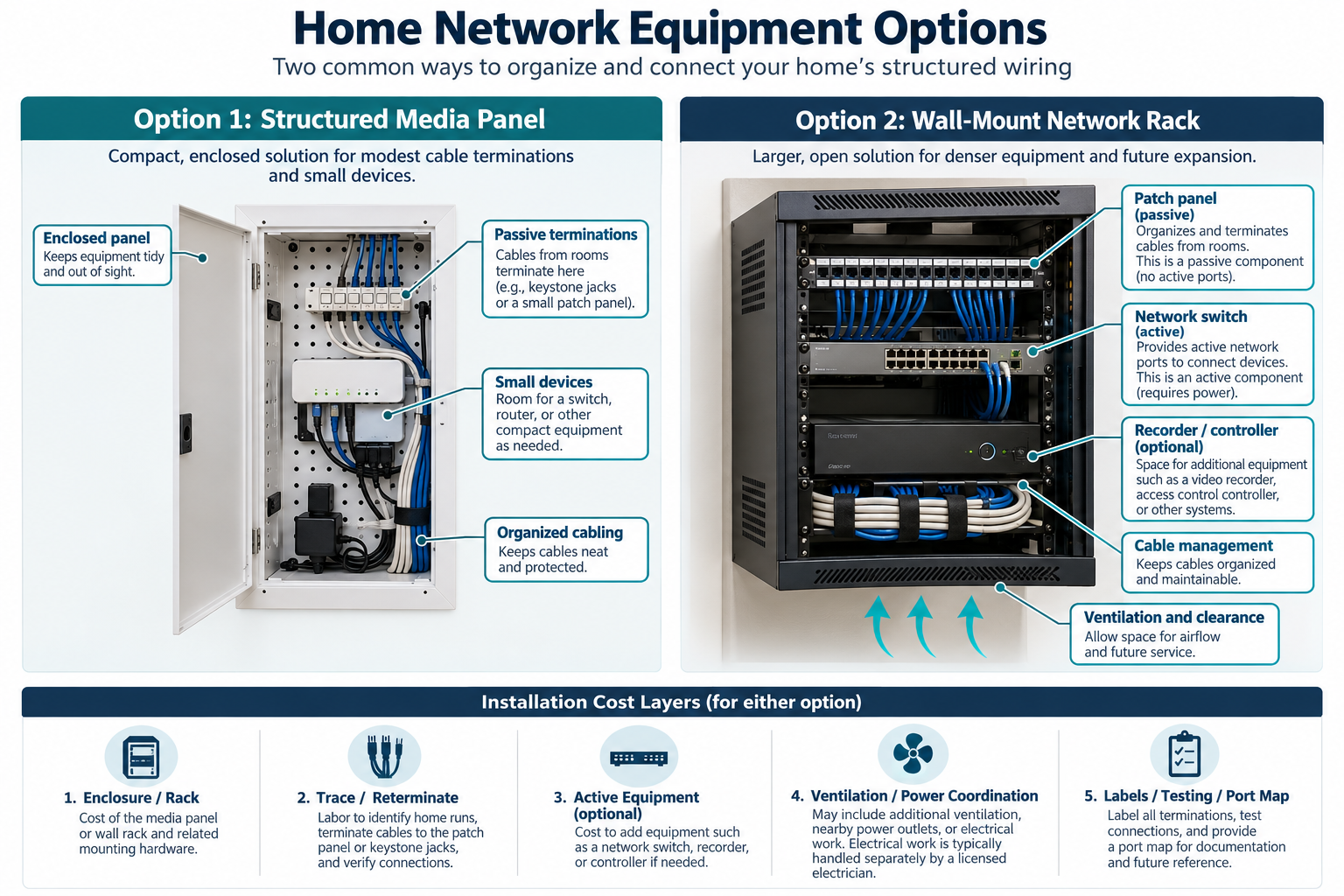
Centralization is an infrastructure decision. It can make cables, network equipment, cameras, alarms, and smart-home controllers easier to service, but it adds equipment, space, heat, power, and documentation requirements.
Why centralize equipment?
Scattered routers, switches, patch cables, alarm modules, camera recorders, and hubs are difficult to identify and troubleshoot. A central location can provide:
- organized cable terminations;
- patch panels and cable management;
- a defined switch, gateway, and controller location;
- easier labeling and service access;
- room for future network or low-voltage equipment;
- a cleaner handoff to the homeowner or next technician.
Centralization does not improve a weak network by itself. The rack still needs correctly routed cables, adequate switch capacity, appropriate power, network configuration, and a location that can be reached and ventilated.
Structured panel versus open rack
A structured media enclosure is often a compact, enclosed option for residential cable terminations, small switches, splitters, and low-voltage modules. It can suit a modest number of runs and a wall or closet location.
An open or wall-mounted rack provides more room for patch panels, switches, a recorder, controller, cable management, and future equipment. It needs more wall strength, depth, ventilation, and service clearance. A larger rack is not automatically better; unused capacity still costs money and space.
Ask the installer to show the expected equipment list, rack units or enclosure size, heat sources, and room for future additions.
Hardware costs
The hardware scope may include:
- enclosure, brackets, rack, shelf, and mounting hardware;
- patch panel and modules;
- keystone jacks, fiber trays, or termination hardware;
- cable managers and labels;
- switch, gateway, controller, recorder, or automation equipment;
- ventilation or fans;
- UPS or surge equipment at a planning level;
- cable ties, supports, and service loops.
The patch panel organizes passive cable ends; it does not replace the active switch. A switch with PoE may be needed for cameras or wired access points, while ordinary Ethernet devices may use a different capacity. Exact equipment should be matched to the system rather than selected by rack appearance.
Cable retermination and relocation
Moving equipment to a rack may require tracing cables, reterminating ends, replacing damaged connectors, extending short runs, labeling ports, and testing each connection. A cable that reaches an old router may not reach a new central location. Existing coax, alarm, camera, and control wires may each need different termination and documentation.
Ask whether the installation includes only the rack or also relocation and retermination. A rack with unlabeled cables is an expensive container, not a complete infrastructure improvement.
Ventilation and equipment density
Switches, recorders, gateways, and controllers produce heat. A cramped closet or sealed enclosure can reduce service life or create nuisance failures. The installer should assess ventilation and service clearance for the actual equipment.
The cost of a fan or larger enclosure is often small compared with the cost of moving a rack later. Do not place equipment where it cannot be reached, where water exposure is likely, or where a homeowner cannot see power and status indicators.
Power boundary and UPS
A rack may benefit from a UPS or other power-protection strategy, especially when network, camera, alarm, or automation equipment must remain available during short interruptions. A UPS does not guarantee long backup operation; its capacity must match the load.
New receptacles, branch circuits, dedicated circuits, and line-voltage work belong in a separate electrical scope. The low-voltage installer can coordinate the equipment load and location without silently including electrical modifications in a rack price.
Labeling and documentation
The most durable value of a central panel is often the map. Request labels at room jacks, patch-panel ports, switches, cameras, access points, and controller connections. Documentation can include port maps, cable test results, equipment model numbers, network diagram, power arrangement, and photos.
Testing may range from continuity and link checks to cable qualification or certification. Ask which level is included. If the project includes fiber, cameras, or access-control equipment, request the relevant test or commissioning record.
When a larger rack is justified
A larger rack may make sense when the property has many Ethernet drops, PoE cameras, several access points, local recording, automation controllers, audio or other separate systems, a fiber backbone, or a homeowner who expects future expansion. It may be excessive for a few room drops and one router.
Avoid buying rack capacity for unplanned equipment. Decide what the current and near-term system needs, then leave a reasonable service and expansion margin. A modular panel may be more economical where the system is small and enclosed equipment is preferred.
U.S. and Canadian budgeting
For a Canadian project, request a quote from an installer serving the property’s area using the same scope: the enclosure, equipment list, retermination, UPS and power assumptions, ventilation, cable management, and testing. Ask the quote to separate equipment and labor, applicable site or restoration work, configuration or testing, recurring terms, taxes, and exclusions. Do not derive a Canadian amount by converting a U.S. band.
The available residential pricing evidence is limited, so component pricing plus local labor modeling is more informative than a single national average. Ask the installer to separate equipment, retermination, testing, and power assumptions.
What the quote should include
Ask:
- panel or rack type and size;
- equipment list and future-capacity assumptions;
- patch panels, cable management, labels, and documentation;
- cable tracing, retermination, relocation, and testing;
- switch, PoE, recorder, gateway, and controller scope;
- ventilation and service-clearance plan;
- UPS and line-voltage exclusions;
- warranty, account ownership, and future support.
Choosing a central location
The best location balances short cable routes, dry conditions, service access, ventilation, security, and proximity to power and network entry. A hidden closet can look tidy but be difficult to cool or work in. A utility room may be easier to service but may expose equipment to dust or moisture. Ask the installer to show how the owner will reach every switch, drive, controller, and label.
Size the panel or rack from an equipment list. Include current patch panels, switches, gateways, controllers, recorder, and power protection, then leave reasonable space for additions. Do not pay for a large rack that is not needed, but do not fill a small enclosure so tightly that future repairs require dismantling the system.
Organizing the quote
Separate the centralization work from the new network equipment. The owner may already have a usable router or switch, while the cables still need tracing and termination. Another project may need a new PoE switch, recorder, gateway, controller, or UPS. Pricing these layers separately makes it possible to compare a cleanup and documentation visit with a complete network replacement.
Ask whether the rack includes grounding or bonding work, power protection, ventilation, and physical security, and which of those items belong to another qualified trade. Record every port and device after commissioning. If a future technician cannot tell which cable feeds a camera or access point, the rack has not delivered its full service value.
The value of a documented central point
A central panel or rack is an asset only when another person can understand it. Label the room ends, patch ports, switch ports, controller connections, power supplies, and unused pathways. Photograph the finished arrangement and record model numbers and account ownership. These details lower future service cost and make an equipment change less likely to become a full diagnostic project.
Before approving centralization
Ask what equipment will move, what will remain, and which cables will be left unused. Confirm that the central location is dry, reachable, ventilated, and documented. A smaller, well-organized panel can be a better value than a large rack that adds space and power demands without solving a service problem.
Setting a useful stopping point
The centralization project is done when the equipment is accessible, the cables are labeled, the ports are tested, and the owner can identify the power and account responsibilities. Do not add rack size or active equipment merely to fill unused space.
Key points
- Centralization adds organization and service value but does not fix network design automatically.
- A structured panel suits a smaller system; a rack may fit denser equipment and future expansion.
- Retermination, tracing, labels, testing, ventilation, and documentation can cost as much as the enclosure.
- New receptacles and circuits are separate electrical work.
- Size the central location around actual equipment and a reasonable expansion margin.
Final quote checkpoint
Before approval, confirm that the selected location is dry, reachable, ventilated, and has adequate service clearance and power. State who supplies active equipment and whether any electrical, grounding, or bonding work is excluded. Require an equipment and port map, test results, and named ownership of configuration and accounts so the central point can be serviced later.