
In U.S. planning examples, a professionally selected and configured consumer or prosumer mesh Wi-Fi system may cost about $300–$1,500 for equipment, placement, setup, and basic testing. A larger or difficult property with several nodes, a gateway replacement, wired backhaul, network cleanup, device migration, or ongoing support can reach $1,500–$4,000.
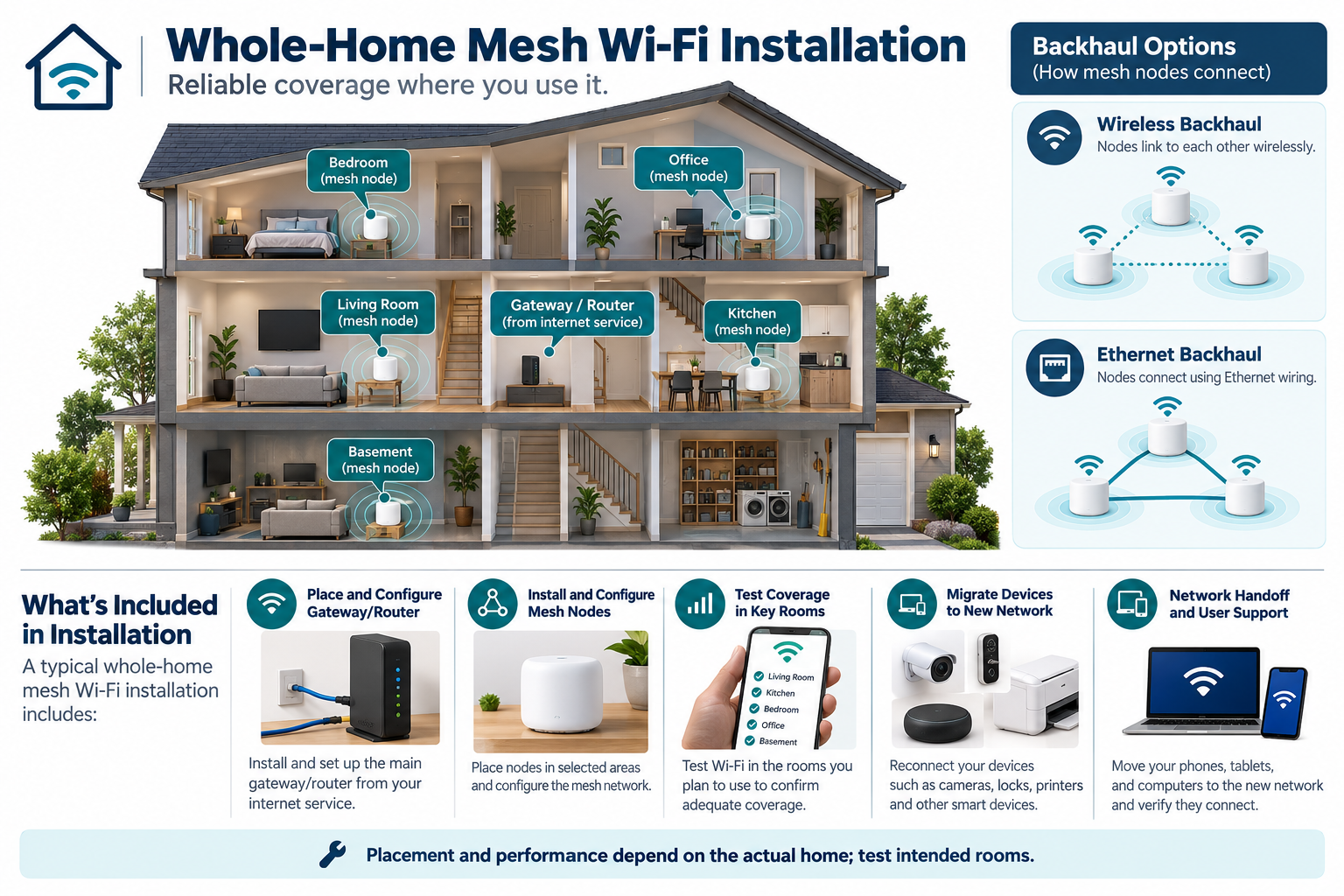
Mesh Wi-Fi is a coverage project, not an internet-service upgrade. A faster plan does not automatically fix radio dead zones, poor node placement, old wiring, or a crowded network. The project should define the coverage objective, equipment, backhaul, configuration, and what testing is included.
What a mesh installation includes
A complete project may include:
- a router, gateway, mesh nodes, or access points;
- site review and node-placement plan;
- wireless or wired backhaul;
- Ethernet patch cables or limited new cable work;
- configuration of network name, passwords, guest access, and updates;
- reconnecting household devices;
- coverage or performance testing;
- troubleshooting and documentation;
- optional support or managed service.
Some homeowners only need equipment and a guided setup. Professional help is more valuable when the home is large, has thick walls or several floors, contains many smart devices, uses a complex router arrangement, or has a network that has been changed repeatedly over time.
Equipment and setup cost
Equipment cost follows node count, gateway features, Wi-Fi generation, wired-backhaul capability, security support, and whether a modem or existing router is replaced. The most expensive system is not automatically the best fit; extra nodes can increase interference or complexity if placed poorly.
Setup labor can include identifying the existing modem and router, removing or reconfiguring old equipment, setting network credentials, placing nodes, updating firmware, creating guest or device networks, reconnecting cameras and smart-home devices, and documenting the final arrangement.
Ask whether the technician is configuring a clean network or simply adding another router. Multiple unmanaged routers can create confusing paths and poor roaming. The installer should explain the final gateway and node roles.
Home layout and node count
Radio performance depends on building materials, floor plan, distance, interference, device density, and node placement. Concrete, brick, metal, foil-backed insulation, appliances, and dense floor assemblies can change the usable path. Advertised coverage areas are not guarantees for a specific home.
The right number of nodes is a design result. Too few may leave dead zones; too many may add cost without improving service. Ask where each node will sit, what room or area it is expected to cover, and how the installer will check the result.
A garage, basement, detached office, or outbuilding may need a separate link. Do not assume a mesh node in the house can reliably cover a remote building through exterior walls and distance.
Wireless versus wired backhaul
Wireless backhaul lets nodes communicate over the radio network. It may be the most economical approach when no cable exists and the building path is reasonable. Each additional wireless hop can affect capacity and placement, and the result is property-specific.
Wired backhaul uses Ethernet between a node and the network. It can improve the available path for some designs, but it adds cable, terminations, switch capacity, and access labor. A finished-home cable route may cost more than the mesh hardware. New-construction or renovation work can make wired pathways more economical.
When a project requires several ceiling-mounted PoE access points, a controller, gateway, rack, and structured cabling, it may be a professionally installed wired access-point system rather than ordinary mesh. Price that architecture separately.
When Ethernet work adds cost
Ethernet can add cost for a node that must move away from the router, a difficult floor, a remote room, or a high-demand location. The route may use existing cable, surface raceway, an attic, crawlspace, or a finished-wall retrofit. Include jacks, cable, terminations, testing, and restoration.
Do not confuse a wired backhaul with an internet-provider installation. The former changes the home’s internal network; the latter changes the service entering the property. They may be coordinated but are separate decisions.
Device migration
Changing the network name or password can require reconnecting cameras, printers, televisions, locks, alarms, thermostats, sensors, and appliances. Device migration labor may be small for a few devices and substantial in a smart home with dozens of endpoints.
Ask whether the quote includes inventory, reconnection, account recovery, firmware updates, and testing. Some older devices may not support current security settings or may be difficult to recover. A clean network setup can expose an end-of-life device that needs replacement.
The homeowner should retain administrator access and a written network record. U.S. consumer guidance recommends changing default credentials, enabling encryption, checking updates, using two-factor authentication where available, disabling unused features, and disconnecting obsolete devices. Canadian guidance similarly recommends secure networks, updates, unique strong passwords, privacy consideration, expected service life, and factory reset at disposal or transfer.
Coverage testing and support
Ask what the installer will test: signal strength, roaming, wired links, device reachability, throughput, or only that the nodes are online. The test should match the homeowner’s goal. A coverage project should include the rooms and outdoor or basement locations that matter.
Support may be a one-time visit, remote assistance, or a recurring plan. Price future changes, replacement nodes, firmware questions, and troubleshooting. A cloud-managed mesh system may have account and subscription terms; record them before approval.
Cost scenarios
These scenarios describe different design problems rather than fixed package tiers. Node count, wired backhaul, device migration, and support can change the total substantially within each home size.
Small finished home
A replacement gateway or two-node mesh may be a modest equipment and setup project if coverage is simple and devices can reconnect without extensive service.
Large or multi-story home
More nodes, difficult materials, wired backhaul, a rack, and device migration can move the project toward the upper range.
Smart-home-heavy property
Cameras, locks, alarms, automation, and environmental sensors make the network a prerequisite. Configuration, account ownership, security, and documentation become part of the economic decision.
U.S. and Canadian budgeting
For a Canadian project, request a quote from an installer serving the property’s area using the same scope: property layout, node count, wired backhaul, gateway, device migration, and coverage verification. Ask the quote to separate equipment and labor, applicable site or restoration work, configuration or testing, recurring terms, taxes, and exclusions. Do not derive a Canadian amount by converting a U.S. band.
The available technical guidance supports network-design relationships, not a guaranteed coverage area or national package price. Get a quote based on the property and expected use.
When managed wired Wi-Fi is a different project
A professional wired access-point system usually includes Ethernet drops, PoE switching, a gateway or controller, mounting, structured equipment, configuration, and testing. It may be the right choice for a large or highly connected property but is not simply “more mesh.”
Compare the two systems on cable access, node or access-point count, backhaul, service, guest and IoT network needs, future expansion, and five-year replacement cost. The best system is the one the homeowner can maintain.
A better way to scope coverage
Make a list of the rooms and outdoor areas where service matters, along with the devices that cannot tolerate an unstable connection. Include cameras, locks, alarms, work areas, and outbuildings rather than evaluating coverage only beside the router. The installer should explain which node serves each area and how the final result will be checked.
Ask for a network handoff that records the gateway, node locations, administrator account, firmware responsibility, and any wired links. If the network name or password changes, decide whether device reconnection is included. A mesh system can appear inexpensive until cameras, hubs, and appliances need to be migrated one at a time.
Avoiding an oversized mesh system
The least expensive result may come from improving placement or adding one properly connected node rather than buying a large bundle. Have the installer test the rooms that matter and explain whether a node uses wireless or wired backhaul. If a node is placed where the signal is already weak, it may extend the problem rather than solve it.
Also distinguish coverage from capacity. A home may have a strong signal but too many devices, an overloaded gateway, or a configuration problem. Conversely, a large home may need a wired access-point design rather than more wireless hops. A scope-based diagnosis prevents the equipment count from becoming the only answer.
Key points
- Mesh cost includes placement and configuration, not just nodes.
- Building materials, node count, backhaul, device migration, and testing drive the project.
- A faster internet plan does not correct internal Wi-Fi coverage by itself.
- Wired backhaul can improve the design but adds Ethernet access and equipment work.
- Keep account ownership, security maintenance, and ongoing support in the budget.
Final quote checkpoint
Have the installer show node placement and backhaul, then test the rooms, devices, and load that define success. Record credentials, firmware and support responsibility, any excluded device migration, and known coverage gaps. More nodes do not guarantee a better result; compare wired access points when cameras, locks, work areas, or outbuildings need predictable service.