
In U.S. planning examples, a professionally designed wired access-point Wi-Fi system may cost about $1,500–$5,000 for several access points, Ethernet or PoE cabling, a switch, gateway or controller, configuration, and testing. A large property with difficult routes, many access points, a rack, cameras, outbuildings, guest and device networks, or ongoing support can exceed $5,000–$15,000.
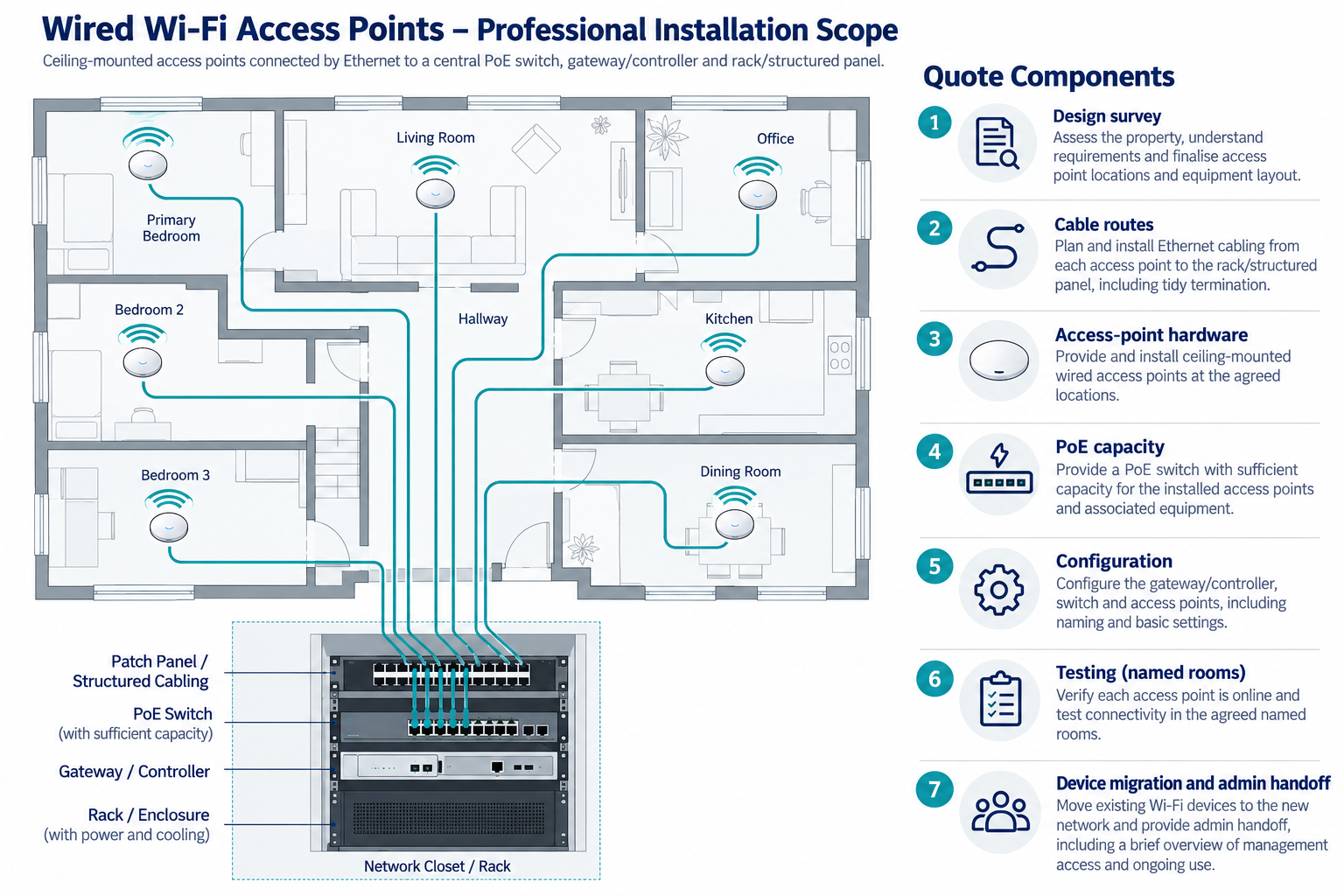
This is a managed infrastructure project, not simply a larger consumer mesh kit. The cost includes a design for where access points belong, how they connect, how the network is powered and managed, and how the result will be tested and supported.
How it differs from mesh
Consumer mesh typically places several nodes that communicate wirelessly or through optional Ethernet. A professionally installed wired system connects ceiling- or wall-mounted access points to Ethernet, often with Power over Ethernet, and centralizes the gateway, switch, controller, and documentation.
The distinction matters when a home has several floors, dense construction, many connected devices, difficult roaming, outdoor coverage needs, or a homeowner who wants a documented network. A simple finished home may not justify the cable and managed equipment cost.
Equipment architecture
A typical system may include:
- ceiling- or wall-mounted access points;
- Ethernet cable and terminations;
- a PoE-capable switch or separate power arrangement;
- router, gateway, firewall, or controller;
- structured media panel or rack;
- configuration for guest, household, and smart-device networks;
- site testing, labels, documentation, and support.
The actual hardware is product-specific. In a supported PoE design, a switch may provide both network data and power to an access point. The installer must match the switch power budget, cable, access point, controller, and gateway rather than assume that every PoE combination is interchangeable.
Access-point count and design
Count should follow the floor plan, construction, device density, outdoor needs, and coverage objective. Manufacturer coverage maps are not a guarantee for a particular property. A professional may survey the site, model likely locations, and test the installed result.
Too few access points can leave dead zones or force high transmit power and poor roaming. Too many can add equipment and configuration without improving performance. Ask what each access point is expected to cover and how overlap, channels, and handoff will be managed.
An outbuilding or gate area may require a separate fiber, copper, or wireless link. Do not include a remote building simply because the main house has enough access points.
Cable and PoE costs
Ethernet runs, jacks, terminations, patch panels, pathways, and testing make up the physical infrastructure. Finished walls, multi-story routes, plaster, masonry, attics, crawlspaces, and exterior locations can dominate labor. New construction or open-wall renovation often makes multiple access-point runs more economical.
PoE adds switch capacity and power-budget planning. The exact requirement comes from the selected access points and switch. A switch may also power cameras, phones, or other devices, so the whole load matters.
Bundling access-point runs with cameras, Ethernet outlets, alarm, doorbell, or automation paths can reduce repeated access. Each system still needs appropriate termination, configuration, and documentation.
Gateway, controller, and rack
The gateway may provide routing, firewall, authentication, remote management, or other functions. A controller may be integrated or separate. A rack or structured panel can house the gateway, switch, patch panels, recorder, and automation equipment.
Centralization adds cost for enclosure, cable management, ventilation, labels, and service access. New receptacles, branch circuits, UPS installation, and other line-voltage work belong in a separate electrical scope. The network installer can state equipment load and location requirements without silently including electrical changes.
Configuration and testing
Professional configuration may include network addressing, access-point adoption, wireless settings, roaming, guest access, smart-device network separation, firmware updates, remote-management enrollment, and device reconnection. The homeowner should receive the administrator account and a usable handoff record.
Testing should reflect the stated goal: coverage in named rooms, wired backhaul, access-point reachability, roaming, and connectivity for important devices. Ask whether the installer provides a map of access points, switch ports, cable labels, credentials, and test results.
Technical guidance from CEDIA treats residential networking as an infrastructure discipline involving design, installation, testing, and documentation. That supports paying for the deliverable, not merely for the hardware.
Large-home and difficult-construction drivers
Cost rises with:
- floor count and building size;
- concrete, masonry, metal, plaster, or dense insulation;
- finished-home cable access;
- ceiling height and mounting difficulty;
- outbuilding, outdoor, or detached coverage;
- number of access points and switch ports;
- rack, gateway, controller, and segmentation needs;
- documentation, testing, and support;
- travel and local labor.
The network’s physical path often matters more than access-point retail price. Ask for a site-specific design and a route allowance.
Ongoing support
Managed systems may use a controller account, paid support, remote management, or software terms. Not all professional systems require a subscription, and not every subscription includes hardware replacement. Ask what happens when a controller, switch, or access point fails or is discontinued.
Keep credentials, network diagrams, equipment model numbers, port maps, and update responsibilities. U.S. and Canadian consumer guidance recommends secure credentials, encryption, updates, disabling unused features, privacy consideration, and careful handling of obsolete devices. Those practices are part of ownership, not a claim that one network product has universal security.
When mesh is enough
Mesh may be more economical when the property is modest, the walls are accessible to radio, a few devices need coverage, and the homeowner accepts wireless backhaul and consumer-level support. Wired access points are more appropriate when cabling can be installed efficiently or when network performance, expansion, and serviceability justify the work.
Compare both systems using the same coverage goal, device load, service horizon, and backhaul assumption. Do not compare a wired professional quote with a mesh equipment box.
U.S. and Canadian budgeting
For a Canadian project, request a quote from an installer serving the property’s area using the same scope: access-point count and locations, PoE, Ethernet route, switch or controller, configuration, and testing. Ask the quote to separate equipment and labor, applicable site or restoration work, configuration or testing, recurring terms, taxes, and exclusions. Do not derive a Canadian amount by converting a U.S. band.
What the quote should include
Ask for:
- a coverage or site-design basis;
- access-point locations and mounting;
- cable routes, access, terminations, PoE, and switch capacity;
- gateway, controller, rack, panel, and power assumptions;
- network configuration, segmentation, device migration, and testing;
- labels, map, credentials, equipment list, and documentation;
- support, software, replacement, and warranty terms.
When the infrastructure premium pays off
The professional system earns its premium when the homeowner benefits from planned cable paths, predictable access-point locations, central management, a documented network, or easier future expansion. It may not be justified when a small home has good radio paths and only a few ordinary devices. Compare the cost against the actual coverage and service problem.
Require the installer to define success before work begins. A useful handoff names each access point, cable and switch port, gateway or controller, network segment, administrator account, and test area. Without those records, the homeowner may still need a new diagnostic visit when one access point or switch fails.
Comparing the managed system with mesh
Request a side-by-side alternative using the same rooms, device load, outdoor areas, and support horizon. The mesh option may use fewer cable runs but more wireless backhaul; the managed option may use more infrastructure but provide central configuration and clearer service boundaries. Include the cost of reconnecting devices and replacing the gateway or nodes.
Ask who can make future network changes. Some owners want an integrator to manage firmware, credentials, and troubleshooting; others want full local control. Neither service model is automatically better, but the labor, account, and support responsibility should be explicit before approval.
Serviceability as part of the design
A professional network should be understandable when one access point or switch fails. Ask for a central port map, access-point labels, configuration backup where supported, administrator ownership, and a procedure for testing a replacement unit. Those deliverables can lower the cost of future service and make the network less dependent on the original installer.
Setting a stopping point
Once the named rooms meet the agreed coverage and the network is documented, more access points may add little value. Future expansion should be based on a measured need, spare switch and cable capacity, and the actual devices the homeowner intends to add.
Key points
- Wired access-point Wi-Fi costs more because it adds design, Ethernet, PoE, centralized hardware, and commissioning.
- Access-point count should follow the property and coverage objective, not a generic coverage promise.
- Finished-wall access and rack or power requirements can dominate the budget.
- Managed networking can be more serviceable when documentation and owner access are included.
- Mesh remains a valid lower-scope alternative when its radio and support assumptions fit the home.
Final quote checkpoint
Get the access-point locations, cable and PoE assumptions, test areas, and device-migration scope in writing. Confirm who owns administrator access, firmware, and replacement support. Wired backhaul does not guarantee coverage through every building material or solve an upstream internet problem; retain port labels, network records, and a unit-replacement procedure for service.