
In U.S. planning examples, a residential network service call may cost about $100–$300 for an initial diagnosis. Cable testing, bad terminations, router or switch configuration, Wi-Fi surveys, device migration, hardware replacement, and documentation can bring a complete visit to $300–$1,500. A large property, recurring fault, difficult cable route, or full network redesign can cost more.
Network service is often classified as IT support, low-voltage work, electrical work, or smart-home integration. Prices and deliverables therefore vary. The first question is what the technician will diagnose and what evidence will be provided—not only the hourly rate.
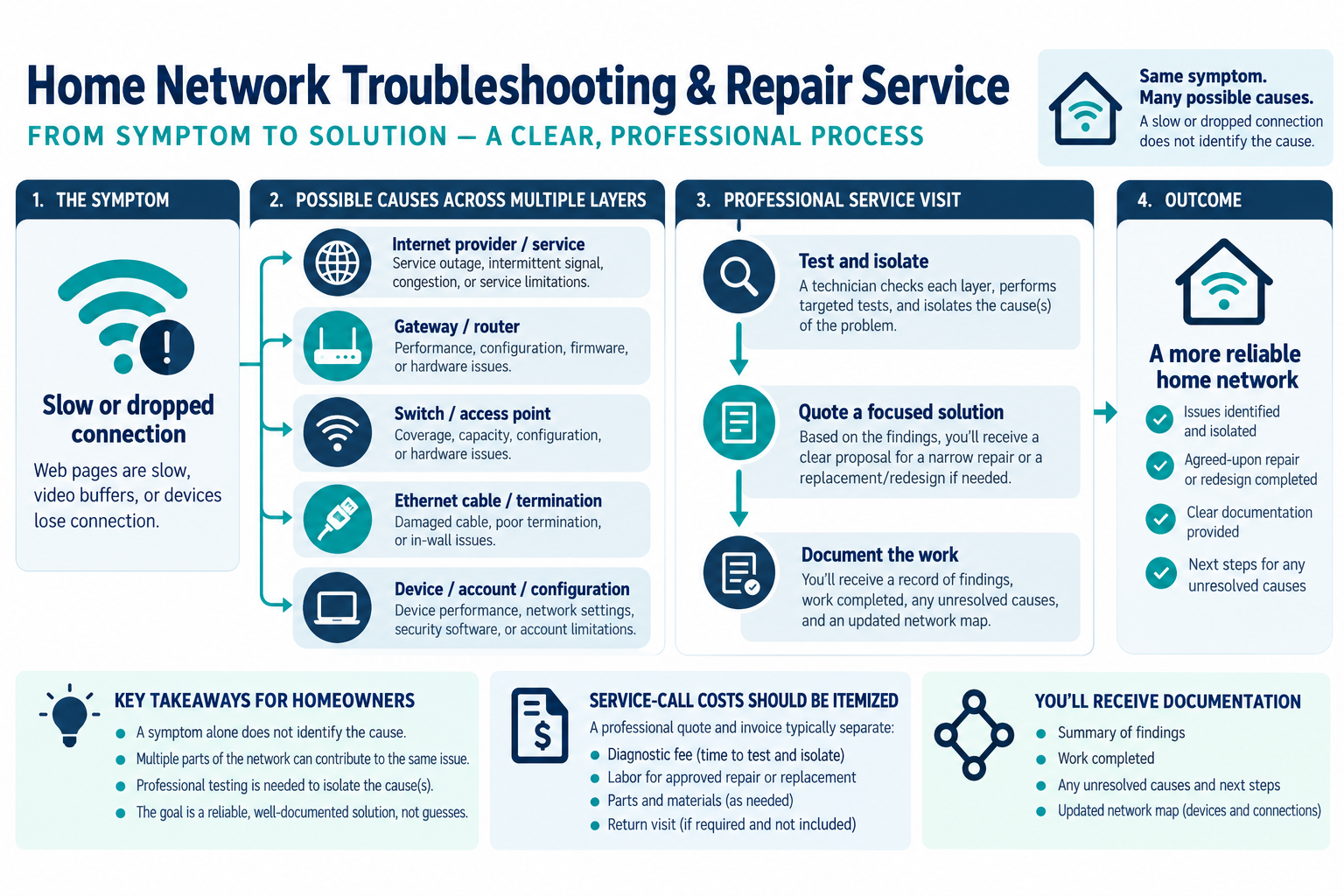
What a service call can diagnose
A technician may investigate:
- dropped Wi-Fi or poor coverage;
- a dead Ethernet wall port;
- a device that cannot reach the internet or local network;
- slow or unstable roaming;
- failed cable terminations;
- switch, router, gateway, or access-point faults;
- duplicate routers or configuration conflicts;
- camera, alarm, lock, or automation disconnections;
- firmware, credentials, or account problems;
- undocumented wiring and central-equipment layout.
The same symptom can have different causes. “The internet is slow” might be an internet service issue, a weak internal path, a failing switch, a bad cable, radio interference, or a device-specific problem. A remote article cannot establish the cause for a particular home.
Typical pricing structure
| Charge | What it may cover |
|---|---|
| Minimum service call | Travel, arrival, intake, and an initial block of diagnostic time |
| Hourly diagnostic labor | Testing cables, tracing paths, reviewing configuration, and isolating faults |
| Hardware | Router, switch, access point, transceiver, patch hardware, or power supply |
| Cable repair | Retermination, replacement section, new jack, or difficult access |
| Configuration | Network cleanup, firmware, credentials, guest or device network setup |
| Documentation | Port map, network diagram, equipment list, test result, and handoff |
| Return visit | Ordered equipment, inaccessible route, or repair after the diagnosis |
Ask whether the diagnostic charge is applied to approved repair and whether the technician will stop before exceeding a stated labor allowance. A low first-visit fee may not include testing every run or reconnecting every smart device.
Cable and termination faults
An Ethernet problem can be at the jack, patch panel, connector, cable, switch port, or device. A technician may use a continuity tester, qualification tool, tone tracer, or another instrument appropriate to the question. The correct test depends on whether the homeowner needs a basic link check or a deeper cable assessment.
Repair cost rises when the cable is inaccessible, routed through finished walls, damaged by construction, or undocumented. A retermination may be inexpensive if both ends are accessible. Fishing a new run may be more economical than searching for a hidden break.
Ask for the failed port, test result, proposed repair, and any limitation in writing. A “bad cable” conclusion without identifying what was tested is not a complete diagnosis.
Router, switch, and access-point issues
Configuration problems can include multiple routers, wrong network roles, outdated firmware, incorrect credentials, an exhausted switch, poor node placement, or a device that cannot use current settings. Hardware replacement may solve a problem, but the technician should explain why the old equipment is unsuitable.
A switch or access point may fail while some devices continue working, which can make diagnosis confusing. Ask whether the technician will isolate the fault by testing known-good ports or equipment. The final network should have a documented gateway, switch, access-point, and cable relationship.
Wireless coverage analysis can include signal survey, channel conditions, building materials, roaming, wired versus wireless backhaul, and device locations. The cost depends on the goal. A quick dead-zone visit is different from a designed multi-access-point network.
Configuration and smart-home devices
Changing the router, network name, password, security mode, or addressing can disconnect cameras, alarms, locks, printers, appliances, hubs, and automation controllers. Reconnecting them may be more labor than the network hardware change.
Ask whether the quote includes an endpoint inventory, account recovery, firmware updates, device migration, and test. Some older devices may not support current security controls and may need replacement. Keep the homeowner’s administrator account and a list of service dependencies.
U.S. consumer guidance recommends changing default credentials, enabling encryption, checking updates, using two-factor authentication where available, disabling unused features, and disconnecting obsolete devices. Canadian guidance similarly recommends secure networks, updates, unique strong passwords, privacy consideration, expected service life, and factory reset before transfer or disposal.
Repair versus replacement
Repair is often sensible when the fault is isolated, hardware is supported, wiring is accessible, and the network design still meets the homeowner’s needs. Replacement or redesign may be more economical when equipment is obsolete, several failures recur, cables are undocumented, or the network has grown beyond the original design.
Do not replace the internet plan to solve an internal network issue without testing. Do not replace every access point because one cable or configuration is wrong. Conversely, do not repeatedly repair a network that lacks capacity, serviceability, or supported hardware.
Ask the technician for a diagnosis, a narrow repair option, and a replacement or redesign option when appropriate. Compare equipment, labor, documentation, future support, and recurring software costs.
Cost scenarios
The right budget depends on how far the diagnosis must go. A single accessible fault is a narrower job than a whole-home outage involving cabling, network equipment, and connected devices.
Single dead port
An accessible jack or termination may be a short service visit. The price rises if the cable must be traced or the central end is unknown.
Whole-home dead zones
A survey, node relocation, mesh redesign, or wired access-point project may be needed. Coverage work is broader than replacing one router.
Smart-home outage
The technician may need to identify the shared network dependency and reconnect multiple hubs, cameras, or controls. Account ownership and documentation matter.
Recurring intermittent fault
Intermittent failures can take longer because the technician must reproduce or isolate the condition. Ask whether monitoring time or a return visit is included.
What to ask before approving
Ask:
- What is the diagnostic question and what will be tested?
- Is the fee a minimum, hourly charge, or fixed package?
- Which cables, ports, devices, and locations are included?
- What test tools and deliverables will be provided?
- Are configuration, firmware, account, and device migration included?
- What hardware replacement is recommended and why?
- Will the technician document the final network?
- What happens if the issue is the internet provider rather than the internal network?
- What is the return-visit and change-order rule?
U.S. and Canadian budgeting
For a Canadian project, request a diagnostic estimate from network technicians serving the property’s area, using the same scope: diagnostic time, cable tests, repairs, configuration, replacement hardware, and documentation. Ask for an itemized price covering relevant equipment, labor or service, site or access work, setup or testing, recurring terms, taxes, and exclusions. Do not derive a Canadian amount by converting a U.S. band.
Getting value from a diagnostic visit
Give the technician a list of the symptoms, affected rooms, important devices, recent changes, and times when the fault occurs. Ask for a diagnosis that separates the internet service, internal network, cable, hardware, configuration, and endpoint possibilities. That makes it easier to approve a narrow repair rather than a premature whole-home replacement.
Before closing the visit, request the final network map, equipment list, changed credentials or account instructions, failed-port results, and any limitation that remains. A documented repair can reduce future service time, while an undocumented configuration change may make the next problem harder to isolate.
Key points
- Network repair pricing is usually diagnostic labor plus parts and configuration.
- Cable faults, Wi-Fi design, router conflicts, hardware failure, and account problems have different cost paths.
- A higher internet plan does not automatically repair the home’s internal network.
- A good service result identifies what was tested and documents the final system.
- Compare a narrow repair with a redesign when faults are recurring or equipment is obsolete.
Final quote checkpoint
Before approving replacement, require the diagnosis to distinguish the provider connection, gateway, router, switch, cabling, access points, devices, and configuration. Record what failed, what remains uncertain, any replaced parts or network changes, and what configuration or account work is included. For intermittent faults, agree on an observation period and return-visit trigger. The handoff should include a network map and remaining limitations so a new device is not mistaken for a repair.