
Whole-home automation has no single comparable price range because guides and integrators define the project differently. Use published figures as scope-specific examples, then compare quotes for the actual rooms, devices, integrations, programming, and support included.
“Smart home” covers very different project scales. A homeowner adding a few app-controlled devices is not making the same decision as a homeowner commissioning a coordinated system with scenes, schedules, centralized control, and professional service. Normalize the scope before comparing quotes.
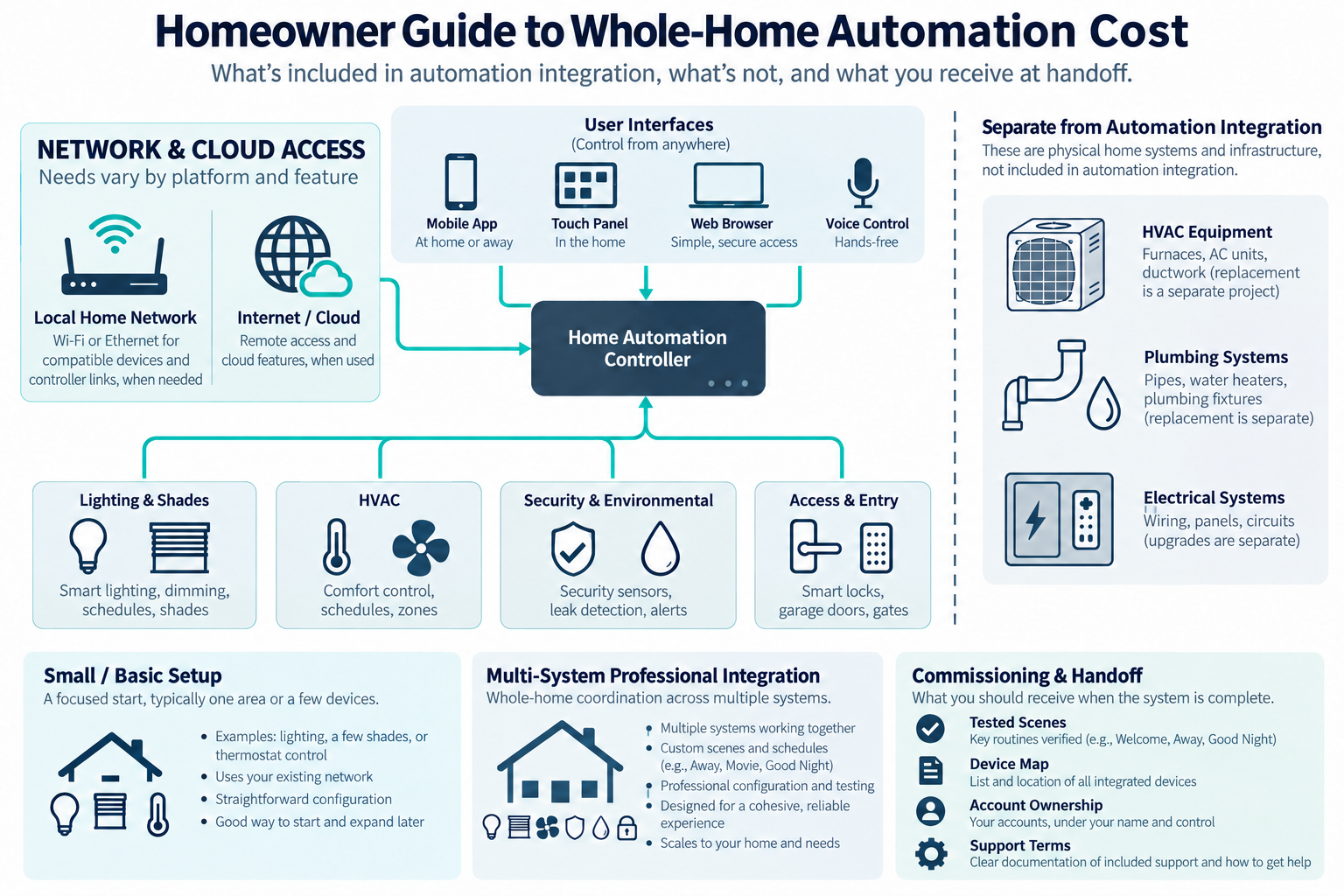
Remote app control away from home depends on the platform, account, service, and network path; it is not included with every automation system.
What counts as whole-home automation
Whole-home automation coordinates multiple systems through a controller, hub, app, keypad, touchscreen, voice interface, or other control path. The low-voltage and integration scope may include:
- central controller or hub;
- network gateway, wired access points, or structured equipment;
- interfaces and user controls;
- security, camera, access, leak, freeze, or environmental integration;
- lighting, shade, HVAC, or energy-control integration;
- scenes, schedules, alerts, and rules;
- programming, testing, owner training, and documentation;
- support, software, cloud, or monitoring services.
The underlying physical system remains in its appropriate category. Automation can control HVAC, lighting, shades, or energy devices without owning the replacement of those systems or any line-voltage work.
Published price examples use different scopes
Angi’s 2026 cost guide lists $2,500–$10,000+ for advanced whole-home automation with custom integration. Other sections of the same guide give different whole-home and home-size figures, so its categories are directional estimates rather than matched installed packages.
Rivas Technology Group’s South Sound price page lists these Control4 project bands as of September 2026:
| Published package | Provider’s price | Listed scope |
|---|---|---|
| Entry system | $15,000–$25,000 | A 2,500–3,500-square-foot home with a Core controller, six to ten dimmers and keypads, a remote or touchscreen, a managed network, and programming. |
| Whole-home system | $35,000–$100,000 or more | Adds shades, Ajax security integration, climate, audio in every zone, touchscreens, and a ventilated rack. |
These are one South Sound provider’s offers, not a representative market interval. Its page uses $ without an ISO currency code; confirm currency, taxes, and inclusions in a written proposal. Do not combine this local offer with Angi’s guide to create one low-to-high range. For a large project, ask the integrator to price the required systems, rooms, interfaces, scenes, and ongoing support separately.
Basic versus professionally integrated scope
A basic setup may involve choosing a hub, pairing devices, naming rooms, and creating a few scenes. A professional integration adds discovery, system design, network readiness, device compatibility, programming, commissioning, training, and future service.
The cost difference is not just the controller. Professional design reduces the risk that separate devices cannot work together or that a future change breaks several automations. It also creates a handoff record, but the value depends on what is actually documented.
Ask every bidder to describe the number of systems, rooms, devices, interfaces, scenes, schedules, and user accounts included. A “whole-home” label is not enough.
Equipment and controller costs
Equipment may include a controller, bridges, gateways, sensors, touchscreens, keypads, network hardware, device modules, and mounting. The selected platform may be local, cloud-connected, or hybrid. Some systems require a dealer or integrator for programming; others can be owner-configured.
The Connectivity Standards Alliance describes Matter as an open protocol using Bluetooth Low Energy for setup and Wi-Fi, Thread, or Ethernet for network connectivity. It lists categories including locks, HVAC controls, lighting and electrical, safety and security sensors, and shades, while noting that support evolves and implementation remains product-specific.
Protocol support does not guarantee that every device, scene, cloud feature, or account will transfer across platforms. Use current product documentation for the actual system and record compatibility assumptions in the quote.
Network and wiring prerequisites
Automation depends on the network more often than a device package suggests. A project may need a reliable gateway, access points, wired backhaul, a central panel or rack, Ethernet, PoE, power, and documentation. Poor Wi-Fi or scattered equipment can make integration and future service harder.
A local home network and internet access are separate dependencies. Some platforms use a local network for controller or device links; remote access or cloud features may also need an internet connection. Requirements vary by platform, model, and feature, so identify which path each intended automation uses and have it tested.
Do not assume that upgrading internet speed fixes internal network capacity. A professionally installed network may be a separate project with its own cable, switch, controller, and testing costs. Line-voltage power changes are separate electrical work.
If the project is in new construction or a major renovation, prewire and central equipment planning may lower future access costs. In a finished home, retrofit routes, raceway, and restoration can change the economics.
Programming and commissioning
Programming may include rooms, devices, users, scenes, schedules, notifications, dashboards, voice control, and integrations. Commissioning should test the actual behaviors: what happens when a sensor triggers, a user changes a state, the network is down, a controller restarts, or a service account changes.
Ask for a written list of included scenes and automations rather than a vague “programming allowance.” Complex rules are difficult to price after the fact. Request owner training, a backup or export process where supported, and a clear division between one-time commissioning and future changes.
Integration complexity
Cost increases with:
- number of systems and manufacturers;
- device compatibility and bridge requirements;
- network weakness or retrofit wiring;
- number of rooms and interfaces;
- custom scenes and schedules;
- security, water, life-safety, or access-control interactions;
- account, cloud, and remote-management dependencies;
- documentation and support expectations;
- coordination with electrical, HVAC, shade, plumbing, or gate contractors.
An automation system should not hide a system replacement. A smart thermostat integration is not the same scope as HVAC replacement. A leak alert is not the same as a new main water shutoff. Keep the underlying project cost visible.
Ongoing support and subscriptions
Some systems use cloud accounts, dealer support, remote management, monitoring, or software terms. Not every professional system requires a subscription, and not every subscription includes hardware replacement. Price support, batteries, controller replacement, network service, and device lifecycle over several years.
Support eligibility can depend on the integrator. For example, Rivas Technology Group’s Washington-area CURATOR plan, checked October 11, 2026, is limited to systems it installed, one property, and up to 40 managed devices; on-site labor, equipment it did not install, and Ajax monitoring or Control4 subscriptions are separate. Its published price page uses $ without naming a currency, so it is not a general U.S. price benchmark. Compare the current written support terms separately from commissioning.
Canadian consumer guidance emphasizes privacy, security, expected service life, offline operation, secure network setup, updates, strong unique passwords, and factory reset before transfer or disposal. U.S. guidance similarly emphasizes router credentials, encryption, updates, unused features, and obsolete devices. These are ownership practices, not a promise of universal security or support.
When system-specific work belongs elsewhere
The automation article owns the controller and integration layer. Energy capacity, electrification, or smart-panel decisions may belong in the energy category. Ordinary wiring, receptacles, and line-voltage controls belong with electrical work. Plumbing remains responsible for pipe and valve work. Physical gate construction and operator work remain separate. Accessibility-first adaptations may belong in an accessibility scope.
Clear boundaries reduce change orders and prevent a homeowner from believing that a low-voltage integration quote includes every controlled appliance or building system.
U.S. and Canadian budgeting
For a Canadian project, request a quote from an installer serving the property’s area using the same scope: rooms and devices, lighting and shade scope, climate and security integrations, programming, commissioning, and documentation. Ask the quote to separate equipment and labor, applicable site or restoration work, configuration or testing, recurring terms, taxes, and exclusions. Do not derive a Canadian amount by converting a U.S. band.
Quote comparison, commissioning, and handoff
Compare the same rooms, systems, devices, interfaces, scenes, schedules, and integrations. Identify which equipment the integrator supplies and which is owner-purchased. Separate equipment, design, programming, commissioning, training, network work, recurring support, and physical work assigned to HVAC, shade, lock, lighting, plumbing, or electrical trades. Record controller, cable, power, compatibility, bridge, cloud, and account assumptions.
Before approval, require an itemized device inventory, final room map, system diagram, named account owner, user-management and supported recovery process, priority-scene demonstration, and list of tested and untested behaviors. Note dependencies on the local network, internet, cloud service, bridge, or device model; confirm post-handoff changes and support. This makes the installed scope and future service easier to compare.
Key points
- Whole-home automation costs vary mainly by system count, integration complexity, programming, network readiness, and support.
- A controller or protocol label does not guarantee universal compatibility.
- Network, cabling, and central equipment can be prerequisites.
- Automation controls other systems but does not include their physical replacement by default.
- Compare a defined room-and-device scope and a multi-year ownership plan.