
In U.S. planning examples, a small smart-home hub migration may cost about $300–$1,500 for an inventory, new controller, device pairing, and basic automation recreation. A larger migration with incompatible devices, multiple bridges, network cleanup, many rooms, custom scenes, security or access integrations, and professional documentation can cost $1,500–$8,000.
Migration is rarely a simple controller swap. It is an inventory, compatibility, account, network, programming, and ownership project. The cost depends on what can move, what must be replaced, and how much of the old behavior the homeowner expects to reproduce.
Why migrations become necessary
Homeowners migrate when a hub is obsolete, a manufacturer changes support, a controller fails, an account becomes difficult to manage, devices are fragmented across ecosystems, or a new platform better fits the household. A migration may also happen during a move, remodel, security upgrade, or whole-home automation project.
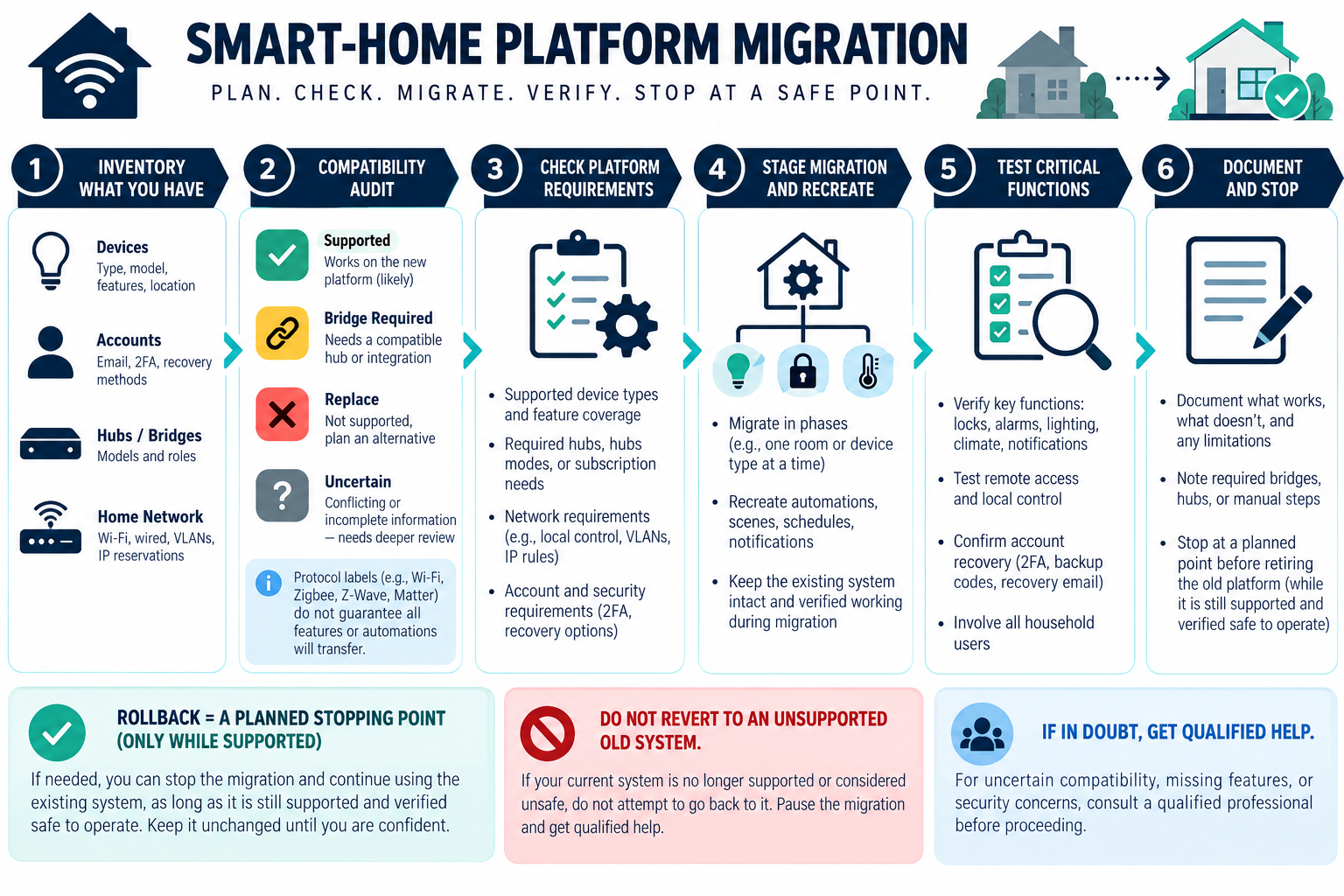
The first task is to describe the current system. List devices, rooms, hubs, bridges, accounts, network connections, scenes, schedules, users, subscriptions, and integrations. Unknown devices and forgotten credentials increase labor and risk.
Compatibility audit
A compatibility audit determines:
- which devices can connect directly to the proposed platform;
- which need a bridge or gateway;
- which retain only basic functions;
- which automations can be recreated;
- which cloud accounts or subscriptions are required;
- which devices must be replaced;
- which network or power changes are needed.
Do not infer support from a logo, app name, or protocol label. The Connectivity Standards Alliance describes Matter as using Bluetooth Low Energy for setup and Wi-Fi, Thread, or Ethernet for connectivity. It also notes that existing Zigbee or Z-Wave devices may participate through bridges and that device-category support evolves.
That means a Matter-capable controller does not guarantee that every existing device, feature, scene, or cloud service will migrate. Shipping product support and current manufacturer documentation matter more than the protocol’s theoretical capability.
Hub, controller, and bridge costs
The replacement may require a controller, hub, Thread border router, bridge, gateway, radio adapter, network switch, or mounting. One device may support several transports while another requires separate bridges. Price the hardware and the support or software terms.
If the old hub also controlled security, locks, leak sensors, cameras, HVAC, shades, or energy devices, replacing it can create separate compatibility and safety questions. Keep life-safety, access, water, and electrical functions within their appropriate qualified scopes.
Re-pairing and programming labor
Re-pairing may involve removing devices from the old system, resetting or enrolling them, assigning rooms, naming devices, updating firmware, creating users, and rebuilding scenes. Some products preserve settings; others require manual recreation. The labor grows with device count and the number of interactions.
Ask the integrator to inventory automations rather than promise “migration.” A scene that turns lights on is different from a rule that combines occupancy, door state, temperature, security mode, and remote notifications. Document what was reproduced, simplified, or left out.
Incompatible-device replacement
Replacement hardware may be the largest cost. Locks, thermostats, cameras, sensors, switches, shades, and controllers can have different platform and wiring requirements. A cheaper device may not preserve the same mechanical, security, or life-safety function.
Use the manufacturer’s current compatibility list for a proposed product. Keep model-specific behavior and support terms in the quote. Do not silently replace a safety-sensitive or access-sensitive device with a different product merely because it pairs with the new hub.
Network cleanup and account changes
Migration can expose duplicate routers, weak Wi-Fi, outdated security settings, old users, forgotten cloud accounts, or an overloaded gateway. The network may need a mesh change, wired access point, switch, new credentials, or device reconnection. Those are separate network tasks but may be prerequisites for a successful migration.
The homeowner should retain the administrator account, recovery information, device inventory, and documentation. U.S. guidance recommends changing default credentials, enabling encryption, checking updates, using two-factor authentication where available, disabling unused features, and disconnecting obsolete devices. Canadian guidance adds privacy, service-life, offline-operation, updates, unique passwords, and factory reset at disposal or transfer.
Matter and multi-ecosystem considerations
Matter can reduce some ecosystem barriers, but it does not replace every platform and does not guarantee that a device implements every feature a homeowner wants. Existing Zigbee or Z-Wave devices may use bridges, while Wi-Fi, Thread, and Ethernet choices affect network and hardware.
Treat support as time-sensitive. Record the date of the compatibility check, selected firmware or product version where relevant, and any feature limitation. A migration plan should include what happens if the new platform loses support or if an essential cloud service changes.
Google Home Matter setup example
Google Home’s setup guidance requires a Matter hub to add Matter devices. A household mixing Wi-Fi and Thread Matter devices needs a hub that also acts as a Thread border router, and Google’s guidance calls for IPv6 network support for Matter setup and communication. Google lists supported hub examples, but product support changes; verify the current hub, router, and device requirements for the proposed installation. This is a Google Home example, not a complete Matter compatibility matrix or a guarantee that every device feature will migrate.
Gradual migration versus one-time change
A gradual migration may be cheaper when devices can coexist and the homeowner can tolerate a mixed platform. It spreads replacement cost and lets the owner test critical routines. The tradeoff is duplicated accounts, bridges, and more complicated troubleshooting.
A one-time migration can simplify the final system and reduce long-term fragmentation but may require more hardware and labor immediately. Compare both paths over the ownership horizon, not only the first visit.
Cost scenarios
Migration scope grows with the number of devices, automations, accounts, and safety- or access-sensitive functions that must be tested. Use the scenarios to distinguish a hub swap from a broader system redesign.
Failed or obsolete hub
The main cost may be controller replacement, device audit, re-pairing, and rebuilding a few scenes. Incompatible legacy devices can change the result.
Fragmented smart home
Multiple hubs, accounts, and network paths increase inventory and configuration time. A network cleanup may be needed before devices can be migrated.
Integrated system
Security, access, water, climate, and shades add testing and consequence. Require product-specific and qualified review for those functions.
U.S. and Canadian budgeting
For a Canadian project, request a quote from an installer serving the property’s area using the same scope: the device and account inventory, controller, re-pairing, automation recreation, integrations, documentation, and cloud terms. Ask the quote to separate equipment and labor, applicable site or restoration work, configuration or testing, recurring terms, taxes, and exclusions. Do not derive a Canadian amount by converting a U.S. band.
What the migration quote should include
Ask for:
- current inventory and account assumptions;
- compatibility status for every device;
- hub, bridge, gateway, and network equipment;
- devices to replace and the reason;
- re-pairing, programming, scene, schedule, and user scope;
- security, access, water, HVAC, and other consequential tests;
- cloud, subscription, support, and cancellation terms;
- documentation, owner accounts, backups, and transfer instructions;
- gradual and one-time migration alternatives.
Protecting the migration result
Before removing the old hub, save an inventory of devices, rooms, users, scenes, schedules, account details, and current behavior. Identify the routines that matter most and test those first on the new platform. A migration that reproduces a few visible scenes but loses security, access, water, or notification behavior is not complete.
Keep the owner account and a written compatibility record. Note which devices use a bridge, which features were simplified, which services remain cloud-dependent, and which products must be replaced later. This makes a future migration less expensive and prevents the next installer from having to rediscover the system.
Protecting critical functions
Prioritize routines that affect access, security, water, temperature, or life-safety notification before convenience scenes. Test a lock, alarm, leak sensor, shutoff, or smoke/CO integration according to the actual manufacturer and qualified installation requirements. If a feature cannot be verified on the new platform, preserve the supported original function or document the limitation rather than treating a partial pairing as success.
Migration can also be an opportunity to remove forgotten accounts, unused hubs, and obsolete devices. Do not delete the old configuration until the new system, recovery method, and owner access have been tested. Keep the old equipment only as long as it is safe and useful, then follow manufacturer instructions for factory reset and disposal.
Estimating the unknown work
Request a paid discovery phase when the inventory or account state is unclear. It is often cheaper to identify devices, recover accounts, and test a small set of critical routines before pricing the full migration. The discovery should produce a compatibility list and a replacement allowance, not an unsupported promise that every old device will transfer.
Before approving a migration
Ask for a discovery inventory when any device or account is unknown. Put the replacement allowance and feature limitations in writing. A careful migration can be staged, but the homeowner should know which critical routines depend on a bridge, cloud service, or future product support before the old platform is retired.
Key points
- Migration cost comes from audit, compatibility, programming, replacement, and documentation—not only a new hub.
- Matter and other protocol labels do not guarantee universal feature transfer.
- Network cleanup and account recovery can be prerequisites.
- Preserve or separately assess security, access, water, and life-safety functions.
- Compare gradual migration with a one-time change over several years.
Final quote checkpoint
Before choosing a migration path, inventory every device, account, hub, automation, integration, subscription, user, and physical dependency. Mark each item as supported, replaceable, uncertain, or to be retired, and identify the automations that matter during an outage. Confirm whether the old system remains available during the transition and whether the installer will export settings, transfer ownership, reconnect devices, test scenes, and remove obsolete accounts. A protocol label does not prove that every feature or automation will carry over. Ask for a rollback or stopping point if a key device cannot be migrated. The final handoff should include the new topology, account recovery method, device map, subscription terms, and a list of behavior that was actually tested.