
In U.S. planning examples, smart-home ownership can add roughly $200–$1,500 per year for cloud services, monitoring, support, batteries, configuration, and routine replacement. A simple owner-managed setup may cost less, while a professionally integrated system with dealer support, security monitoring, camera storage, network management, and scheduled service can cost much more.
Installation price is only the beginning. The homeowner should compare what it costs to keep the system connected, updated, documented, supported, and replaceable over a defined ownership period.
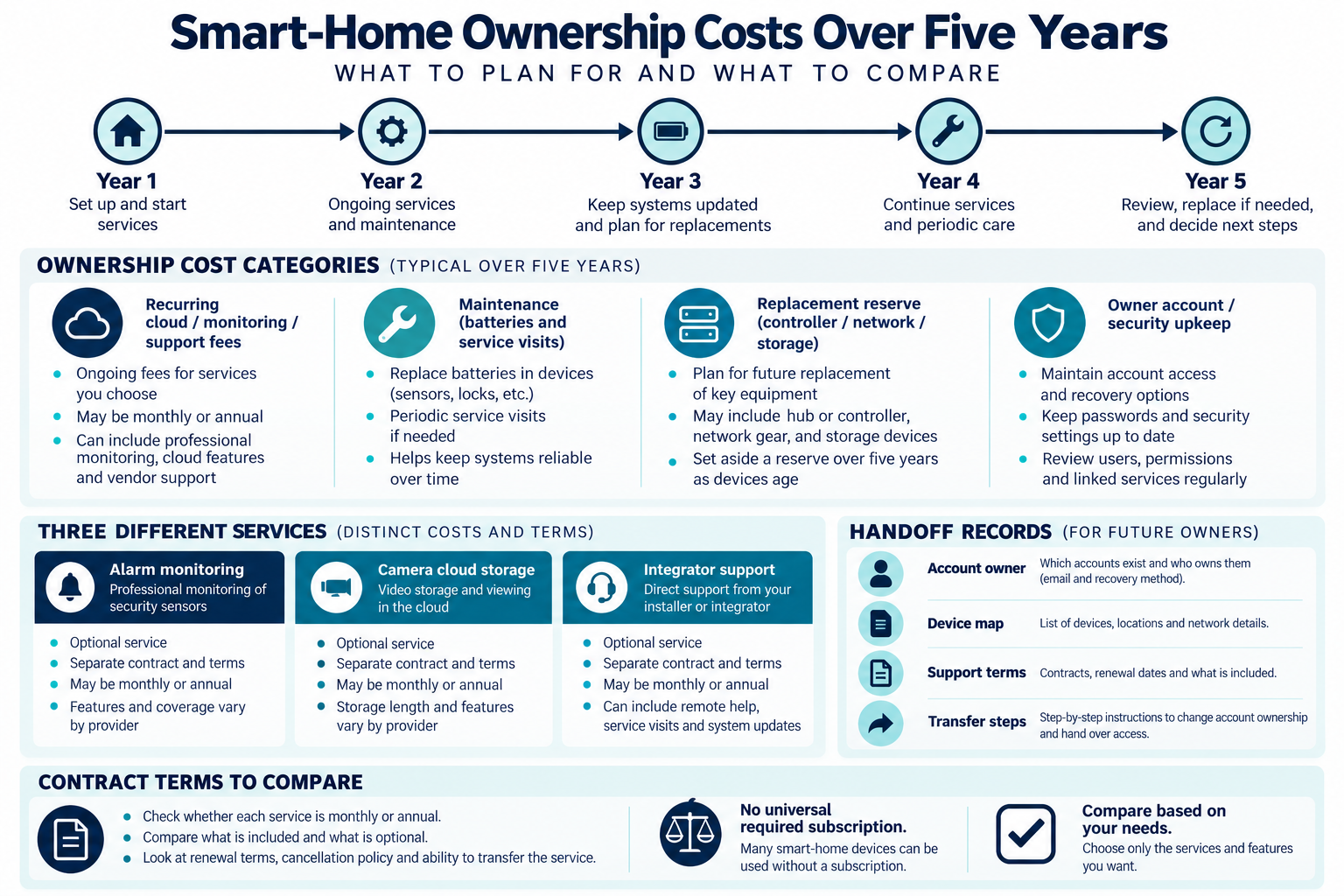
Common recurring fee categories
Ownership cost can include:
- professional security monitoring;
- camera cloud storage;
- remote support or managed network service;
- integrator service agreements;
- software, cloud, or controller fees;
- cellular communication;
- batteries and consumables;
- troubleshooting and configuration visits;
- replacement hubs, switches, drives, cameras, sensors, or access points;
- migration when a platform or account changes.
Not every professional automation system requires a subscription, and not every cloud feature is required. Ask which fee solves which problem and what continues to work without it.
Monitoring and cloud services
Security monitoring provides a provider-defined alarm service and response process. Camera cloud storage provides video retention or related features. A smart-home support plan may provide remote assistance or system changes. These services can overlap in a quote but are not interchangeable.
Ask for current monthly or annual pricing, camera or device limits, retention, service hours, response terms, price changes, cancellation, and transfer provisions. A promotional first year is not a useful five-year estimate without the renewal price.
Local recording may reduce some cloud charges but adds recorder, drives, network, account, and replacement responsibility. Self-monitoring may avoid a professional alarm fee but shifts notification, verification, and maintenance work to the homeowner.
Integrator support plans
A support agreement may cover remote diagnosis, software changes, phone support, priority visits, backups, annual service, or selected replacement labor. It may exclude wiring, new devices, third-party equipment, network problems, batteries, travel, or emergency work.
Ask the provider to define included hours, response time, rollover, after-hours pricing, travel, parts, and the owner’s obligation to maintain the account. A plan is valuable only when its coverage matches the system’s actual complexity and the homeowner’s ability to troubleshoot.
Current provider plan examples
Two current menus show why headline prices need scope and contract terms beside them. Canadian Smart Systems lists per-property plans from CA$49.99 to CA$139.99 monthly and CA$539.99 to CA$1,459.99 annually, advertising 10% annual savings. The tiers mix different amounts of phone or text support, network monitoring, preventive visits, and on-site calls; the monthly Premium tier lists professional alarm monitoring. Monthly and annual inclusions differ, and the page does not state tax or cancellation terms.
Rivas Technology Group in Kent, Washington, lists Base, Plus, and Complete at $79, $169, and $299 per month and $790, $1,690, and $2,990 per year. Its page uses $ without naming a currency and presents annual prepayment as two months free against twelve monthly payments. The plans apply to systems Rivas installed, at one property with up to 40 managed devices. Monthly plans start with a three-month period and then continue month-to-month; annual prepayment is non-refundable. On-site labor, equipment not installed by Rivas, and Ajax monitoring or Control4 subscriptions are separate, and sales tax is added. Monthly amounts are stated as of September 2026 and annual amounts as of October 2026; both pages were checked October 11, 2026.
The Rivas tiers also differ in remote-visit cadence, update windows, included small scene or schedule changes, and whether an annual on-site tune-up is included. Compare those entitlements and the response promise, not just the tier price.
These are named provider offers, not market averages. Confirm the written terms, eligibility, tax, included work, and renewal or cancellation conditions before budgeting.
Batteries and routine maintenance
Battery-powered locks, sensors, cameras, shades, gateways, and backup systems add recurring maintenance. The per-device cost may be small, but a large property, high mounts, seasonal occupancy, or missed alerts can turn it into service labor.
Routine ownership may also include checking alarms, camera recording, network reachability, valve or sensor state, account access, firmware, and controller health. Canadian consumer guidance recommends secure network setup, regular security updates, privacy consideration, expected service life, offline operation, unique strong passwords, and factory reset before transfer or disposal. U.S. guidance similarly emphasizes router credentials, encryption, updates, two-factor authentication where available, disabling unused features, and disconnecting obsolete devices.
Those are practical maintenance expectations, not a universal promise about any product’s update period or security.
Hardware lifecycle
Controllers, switches, access points, recorders, cameras, hubs, and sensors eventually need replacement. The timing depends on product support, failure, network requirements, physical wear, and platform changes. A low annual fee can be outweighed by a large controller or network replacement.
Create a reserve for:
- controller or hub replacement;
- network gateway, switch, and access-point updates;
- recorder and storage drives;
- batteries and power supplies;
- locks, sensors, cameras, and interfaces;
- professional migration or recommissioning labor.
Do not assume that an open protocol eliminates all lifecycle cost. A product may support a protocol while the manufacturer, app, bridge, cloud account, or hardware no longer supports the feature set the homeowner uses.
Proprietary versus interoperable systems
Proprietary systems can provide a coordinated experience and professional support but may limit equipment choice, service providers, or migration paths. More open or multi-vendor systems may provide flexibility but can require more compatibility work and owner-managed troubleshooting.
The Connectivity Standards Alliance describes Matter as an open protocol using Bluetooth Low Energy for setup and Wi-Fi, Thread, or Ethernet for connectivity. It also notes that bridges may allow existing Zigbee or Z-Wave devices to participate and that support for device categories evolves. This does not mean that every product has identical support or that no cloud account is needed.
Ask whether the homeowner can export settings, keep administrator access, replace the integrator, and operate essential functions locally. Record the actual assumptions rather than relying on a category label.
Five-year budgeting
Use:
installation + equipment + recurring fees × 60 months + maintenance + replacement reserve + support
For arithmetic illustration in U.S. dollars, $40 per month adds $2,400 over five years before taxes or price changes. A $75 monthly support and monitoring combination adds $4,500. These amounts are examples only, not current plan prices; use the actual contracts and system requirements.
Model a low-service and high-service case. Include the cost of a technician visit when the homeowner cannot recover a hub, reconnect a device, or troubleshoot a network. Compare the total with a simpler system that may have fewer integrations but lower service dependence.
What changes the ownership cost
The largest variables are:
- number of connected systems and devices;
- cloud, monitoring, and support requirements;
- battery count and access;
- network and controller complexity;
- proprietary equipment and migration options;
- remote or seasonal property conditions;
- camera retention and storage;
- frequency of owner-requested programming changes;
- warranty and replacement terms.
The homeowner’s time also has economic value. A system that saves a monthly fee but requires hours of recovery and maintenance may not be the lowest-cost choice for a busy or remote household.
U.S. and Canadian budgeting
For a Canadian project, compare written service offers from smart-home support providers serving the property using the same scope: cloud subscriptions, support response, on-site hours, batteries, monitoring, renewal, and cancellation. Ask for an itemized price covering relevant equipment, labor or service, site or access work, setup or testing, recurring terms, taxes, and exclusions. Do not derive a Canadian amount by converting a U.S. band.
Questions before committing
Ask:
- Which services are required, optional, or replaceable?
- What is the normal renewal price after promotions?
- What are the term, cancellation, transfer, and price-change rules?
- Are support hours, travel, parts, batteries, and emergency service included?
- Which functions work without cloud or internet?
- Who owns accounts, settings, recordings, and documentation?
- What equipment should be replaced or reserved over five years?
- Can another provider maintain or migrate the system?
- What privacy, update, and obsolete-device tasks remain with the homeowner?
Building an ownership reserve
Separate predictable recurring charges from irregular costs. Monthly cloud, monitoring, cellular, or support fees are easy to count. Batteries, a failed controller, a new network switch, a service visit, or a migration are less predictable and should have a reserve. A system with no subscription can still have significant replacement and owner-time cost.
Ask the installer to provide a five-year ownership schedule with low-service and high-service cases. Include who performs updates, who can recover accounts, which parts are replaceable, and what happens if the integrator or platform is no longer available. Those answers can be more important than a modest difference in monthly price.
A support plan should have boundaries
Ask what the provider will do remotely, what requires a site visit, and what counts as a new project. Adding a device, changing a scene, recovering a password, replacing a controller, troubleshooting a network, and repairing a low-voltage cable are different services. A plan that says “support included” without defining those boundaries is difficult to compare.
Also ask for a transfer procedure. The homeowner should receive current credentials, equipment records, diagrams, warranties, subscription details, and any backup or configuration files that the system supports. This reduces dependence on one individual and can lower the cost of a future sale, service change, or platform migration.
Preparing for ownership changes
Ask how the system is transferred when the home is sold or the service provider changes. The handoff should include account ownership, device inventory, subscription terms, network records, warranties, and any supported configuration backup. A system that cannot be transferred without the original installer has a real economic dependency, even if the monthly support fee is modest.
Key points
- Subscription, support, battery, network, and replacement costs can exceed the initial device price over time.
- Professional automation does not automatically require a subscription.
- Monitoring, cloud storage, and integrator support are different services.
- Protocol openness does not guarantee future product support or zero migration cost.
- Compare five-year ownership and service responsibility before approving installation.
Final quote checkpoint
Write down the service tasks, response time, hours, travel and parts charges, exclusions, renewal and cancellation terms, and what happens if the integrator leaves. Keep owner access to accounts, data, and the current device map. Compare the contract with as-needed visits over the expected ownership period; a useful plan preserves documentation and response capacity.