
Professional monitoring and self-monitoring are different service models, not simply two prices for the same feature. Professional monitoring adds a recurring provider fee and a defined provider response process. Self-monitoring may avoid that fee but leaves notification, verification, and response decisions with the homeowner.
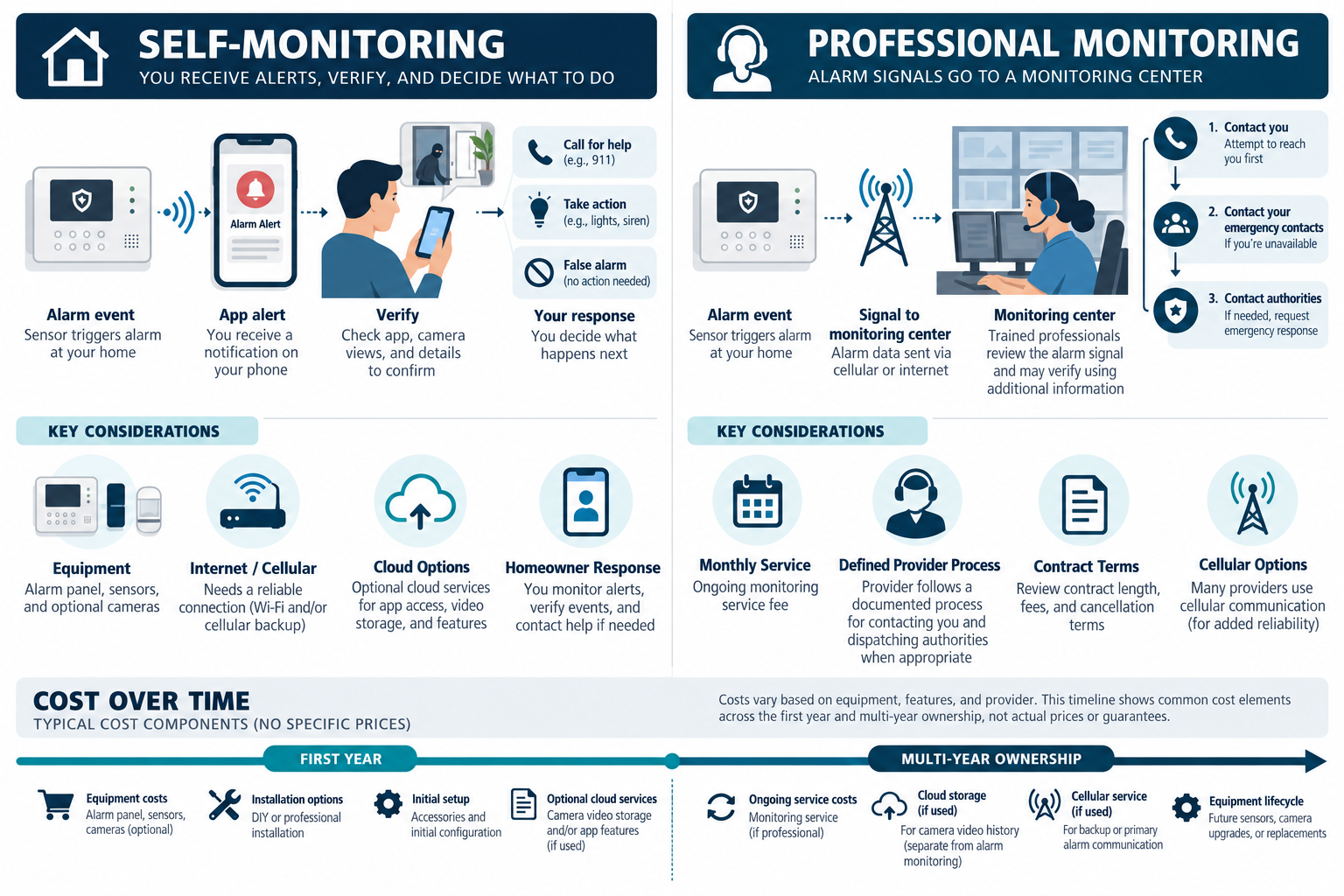
A basic self-monitoring arrangement may have no separate monitoring charge beyond equipment, internet, cellular backup, or optional cloud services. In U.S. examples, professional monitoring commonly adds roughly $20–$70 per month, with higher totals when video, automation, backup communication, or premium support is bundled. Check a provider’s current written offer for its exact terms.
What each model does
With self-monitoring, the system sends an alert to an app, local keypad, text channel, or other configured destination. The homeowner decides whether to call a neighbor, service provider, or emergency service. The homeowner also carries the responsibility for keeping the account, phone, internet, batteries, and notification settings usable.
With professional monitoring, a monitoring provider receives alarm signals under the provider’s stated process. The plan may include operator verification, a contact list, cellular communication, app access, service support, or other features. The provider’s actual obligations, response process, hours, verification method, and contract terms must be read from the current agreement. A monthly fee is not a universal promise of a particular emergency outcome.
Neither model automatically includes video storage, a guard response, local permit registration, or repair labor. These are separate questions that belong in the quote.
Upfront and recurring costs
| Cost category | Self-monitoring | Professional monitoring |
|---|---|---|
| Equipment | Panel or hub, sensors, keypad, power, and backup battery | Same basic equipment, sometimes discounted or financed |
| Setup | DIY time or a one-time installation charge | DIY or professional installation and activation |
| Communications | Internet, optional cellular backup, and app service | Internet and/or provider cellular path |
| Recurring service | May be zero for monitoring, but cloud features can cost extra | Monthly or annual monitoring and possible support fees |
| Response responsibility | Homeowner and designated contacts | Provider follows its agreement and contact procedure |
| Contract risk | Usually tied to equipment or app terms | May include term, cancellation, activation, or equipment conditions |
The word “free” often means that one fee is not charged separately. It does not mean the system has no ownership cost. Include batteries, replacement equipment, account administration, cloud storage, cellular service, and occasional technical support in both comparisons.
Common fee categories
The monthly total can combine several services:
- intrusion alarm signal monitoring;
- cellular backup or a dedicated communicator;
- app access and remote system control;
- camera event storage or continuous recording;
- professional setup, technical support, or service visits;
- automation features or additional user accounts;
- equipment financing or a required service term.
Ask the provider to identify each item. A security monitoring plan is not necessarily the same as camera cloud storage. A camera subscription may provide recording and notifications without an operator monitoring an intrusion alarm. A self-monitored alarm may still use a paid cellular backup service.
Dated Canadian monitoring example
Ring’s Canada storefront, accessed October 11, 2026, listed Protect Pro at CA$29.99 per month or CA$299.99 per year for all devices at one location. Ring says Pro includes 24/7 professional monitoring; its alarm monitoring is available in Canada except Quebec. Applicable taxes are extra; local permit, false-alarm, or verified-guard-response fees may also apply. This is one provider’s bundled subscription, not a standalone monitoring market rate or an installed-system quote. Confirm current availability, eligibility, and terms for the property.
First-year versus long-term cost
The first year is often distorted by promotions, free installation, discounted equipment, or waived activation. Build two views:
First-year cost: equipment, installation, activation, required accessories, and twelve months of recurring fees.
Ownership cost: first-year cost plus recurring charges for the chosen horizon, batteries, expected service visits, equipment replacement, price changes, and cancellation or transfer costs.
For illustration in U.S. dollars, a hypothetical $35 monthly service adds $420 in one year and $2,100 over five years before taxes or price changes. A hypothetical $60 monthly plan adds $720 in one year and $3,600 over five years. Those calculations do not decide the question; they make the recurring commitment visible.
Use the same horizon for self-monitoring. In a U.S.-dollar illustration, if self-monitoring needs a hypothetical $300 cellular communicator, a $10 monthly cloud plan, and a replacement battery or hub, include them rather than comparing a service contract with only the price of a starter kit.
Cellular backup and outage behavior
Ask which functions require household internet, which use cellular communication, and what happens when power or either network fails. A provider may bundle cellular communication, but the property still needs compatible equipment and adequate signal. The research available for this category does not establish one universal backup duration or outage behavior.
Self-monitoring also depends on human availability. If the homeowner is traveling, asleep, in an area without service, or unable to verify the event, the practical response model differs from a provider’s staffed process. Professional monitoring does not remove the need for accurate contact information, tested equipment, and a plan for false alarms.
Contracts, cancellation, and ownership
Read the agreement for:
- contract length and renewal;
- activation or installation charges;
- equipment ownership;
- financing or remaining equipment balance;
- early cancellation;
- price increases;
- transfer when the home is sold;
- what happens to app access, recordings, and cellular service after cancellation.
A lower monthly price tied to a long term may be more expensive if the homeowner moves, changes provider, or discovers that the equipment cannot be reused. A month-to-month plan may cost more each month but preserve flexibility. Put the total expected payment and the cancellation outcome in writing.
Cameras and cloud storage
Camera storage is often the largest add-on. Cloud plans may charge by camera count, retention, recording mode, or advanced detection features. Local recording may reduce cloud charges but require a recorder, storage drive, switch, network setup, and future hardware maintenance.
Do not treat professional alarm monitoring as a substitute for camera recording. A provider may receive an alarm signal without retaining all camera footage, while a camera service may store video without an operator verifying an alarm. Compare each service by the problem it solves and its response or storage limits.
When professional monitoring may be worth the recurring cost
Professional monitoring may be economically reasonable when the homeowner wants a staffed signal path, cannot reliably respond to alerts, needs a provider-managed communication service, or values bundled setup and support. The value is not only the number of notifications; it is the service process the provider actually agrees to provide.
Self-monitoring may fit a homeowner who can respond reliably, wants control over contacts and accounts, accepts the maintenance work, and prefers to avoid a recurring monitoring contract. The apparent savings are weaker if the system is difficult to configure, cloud-dependent, or left unmaintained.
Neither choice should be framed as a universal recommendation. The right answer depends on occupancy, travel, response contacts, property risks, desired service, communications, and the homeowner’s willingness to maintain the system.
Questions before signing
Ask:
- What exactly is monitored, and what is merely an app notification?
- Is cellular communication included, and what equipment supports it?
- Are cameras, cloud recording, automation, or service visits separate?
- How are alarms verified and which contacts are called?
- What are the term, renewal, price-change, and cancellation provisions?
- Who owns the equipment and administrator account?
- What happens to access, recordings, and notifications after cancellation?
- Are local registration, permit, or false-alarm rules the homeowner’s responsibility?
- Which batteries, firmware, and connectivity tests are included?
- Can another qualified provider service the system later?
Local alarm registration and false-alarm rules vary by jurisdiction. Do not assume a provider’s service package satisfies every local obligation. Verify the applicable requirements for the property.
U.S. and Canadian cost boundaries
For a Canadian project, compare current written monitoring offers from providers serving the property using the same scope: the response model, video or automation add-ons, cellular backup, contract term, taxes, and cancellation terms. Ask for an itemized price covering relevant equipment, labor or service, site or access work, setup or testing, recurring terms, taxes, and exclusions. Do not derive a Canadian amount by converting a U.S. band.
Subscription terms also change faster than hardware. Record the date of the offer and the exact features promised. A plan that is economical today may have a different price, storage limit, or transfer rule later.
Choosing a service model deliberately
Revisit the choice when occupancy, travel, response contacts, insurance terms, or system scope changes. A monitoring decision that fit a full-time household may not fit a vacant property, and a service plan that was useful for a complex system may be unnecessary after it is simplified.
Key points
- Professional monitoring adds recurring service and a provider-defined response process.
- Self-monitoring shifts notification, verification, maintenance, and response responsibility to the homeowner.
- Compare first-year and five-year totals, not just installation price or monthly fee.
- Separate alarm monitoring from camera cloud storage and technical support.
- Read equipment ownership, cancellation, renewal, and local-rule assumptions before signing.
Final quote checkpoint
Before selecting a monitoring plan, write down who receives the event, who can verify it, who can call emergency services, and what happens when nobody responds. Compare the monthly fee, activation or takeover charge, cellular path, battery service, false-alarm process, contract term, cancellation terms, and equipment ownership. Self-monitoring still depends on power, network, phone settings, account access, and a person who can act. Professional monitoring does not guarantee dispatch, emergency response, or uninterrupted communications. Ask the provider to explain the actual service area and local registration requirements. Keep local sirens and user procedures in scope even when the homeowner chooses a recurring monitoring service.