
Angi’s October 2026 U.S. cost guide reports a $746 national average for home-security-system installation, based on 1,667 verified Angi Pro projects, and says most reported projects cost $300–$1,236. Angi attributes the spread to system type, camera count, and monitoring choice; its guide says activation fees, permits, and equipment upgrades can bring some totals closer to $2,500. These figures are one guide’s U.S. planning reference, not a quote or Canadian estimate, and the page does not match every price to one equipment and wiring scope. Request separate line items for cameras, controlled entry, and each additional building rather than treating those integrations as part of a comparable alarm-installation range.
These are one guide’s planning figures, not a national price schedule. A quote is only comparable with another quote when both describe the same coverage, installation method, communication path, programming, warranty, and recurring services.
What a home security installation includes
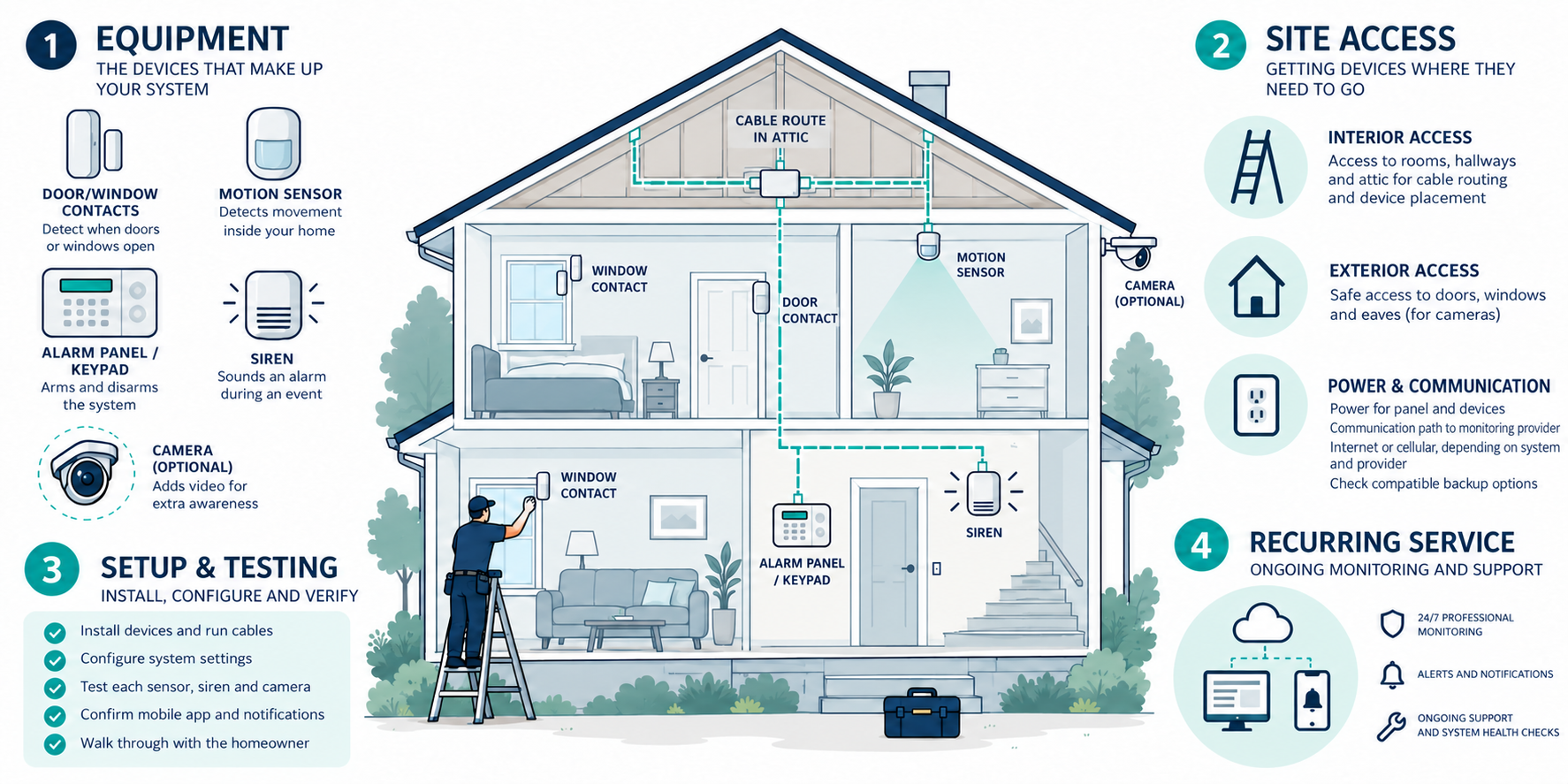
An intrusion alarm normally starts with a control panel or hub, one or more keypads or app interfaces, door and window contacts, motion sensors, a siren, a power supply, and backup power. A system may also include glass-break sensors, panic buttons, smoke or carbon-monoxide monitoring, water sensors, cameras, a video doorbell, or a smart lock. Those additions can change a simple alarm project into a broader low-voltage integration job.
The installed scope also includes decisions that are easy to miss in a product bundle:
- a site assessment and sensor-placement plan;
- cable routes or wireless signal testing;
- mounting and terminations;
- zone naming and user setup;
- internet or cellular communication;
- alarm testing and handoff;
- removal of an old panel or equipment;
- documentation and warranty support.
Ask whether the quoted price includes those tasks. A box of sensors delivered to the house is not the same product as a commissioned system that a homeowner can use and maintain.
Typical cost structure
| Cost component | What it may include |
|---|---|
| Equipment | Panel, hub, sensors, keypad, siren, communicator, backup battery, and mounts |
| Installation labor | Placement, cable pulling, drilling, terminations, mounting, and weather sealing |
| Setup and programming | Zones, users, schedules, app enrollment, notifications, and testing |
| Access and restoration | Attic or crawlspace work, wall openings, patching, paint, or surface raceway |
| Recurring service | Professional monitoring, cellular communication, cloud video, or support |
| Local charges | Possible permit, registration, inspection, or false-alarm-related fees where applicable |
Some providers discount hardware or installation when a homeowner signs a monitoring agreement. That can make the first invoice look attractive while increasing the cost of cancellation or long-term ownership. Request the equipment ownership terms and the service price separately.
Equipment versus professional labor
Equipment cost follows the number and type of protected openings, sensor technology, communication options, and integration features. A basic door contact is a different cost item from an outdoor perimeter sensor, a dual-technology motion detector, or a sensor installed in a difficult location.
Professional labor is driven more by site conditions than by the retail price of the panel. A technician may need to work in plaster, masonry, a finished ceiling, an attic with limited access, a detached garage, or an exterior location. Long routes, high mounting points, concealed wiring, fire-rated assemblies, and finish restoration add time. Wireless systems reduce some cable work but still require placement, signal testing, programming, and battery planning.
DIY installation can be reasonable for a small, accessible system when the homeowner is comfortable with setup and future service. It does not eliminate the need to understand communication failures, low batteries, account recovery, firmware support, or how a monitoring provider handles alarms. Professional installation may be worthwhile when the home is large, the system is hardwired, documentation matters, or the equipment is integrated with other systems.
The main price drivers
Sensor count is only the first variable. The largest changes often come from:
- Access. Finished walls, masonry, crawlspaces, height, and exterior penetrations affect labor.
- Architecture. Wired, wireless, and hybrid systems have different cable, signal, panel, and service requirements.
- Coverage objective. Perimeter-only protection, interior motion coverage, outbuilding coverage, and environmental sensors are different scopes.
- Communication. Internet, cellular backup, or both can affect equipment and recurring cost.
- Compatibility. Existing cable, sensors, keypads, cameras, and locks may or may not work with the proposed panel.
- Programming. Multiple users, schedules, partitions, notifications, scenes, and integrations take commissioning time.
- Documentation. Zone maps, passwords, equipment lists, and test records reduce future service uncertainty.
- Property logistics. Travel, remote locations, winter conditions, and limited service availability can widen local pricing.
The same number of sensors can therefore produce very different quotes. Ask the installer to state the assumptions behind the price rather than relying on the device count alone.
Wired, wireless, and hybrid systems
In a wired system, sensors communicate over cable to a panel or expansion module. The panel may still use internet or cellular service. In a wireless system, sensors use radio communication to a hub or panel, but the hub commonly still needs power and a communication path. A hybrid system combines both.
Wired installation may be economical during construction or a major renovation, when cable pathways are open and a central equipment location can be planned. It can be expensive in a finished home because fishing, drilling, patching, and painting dominate. Wireless can reduce wall work in an existing home, but the installer must verify range, interference, battery access, and backup communication. Hybrid can reuse good existing zones while avoiding a full rewire.
Do not assume existing alarm wire is reusable. It needs to be identified and tested, and the new panel must accept the sensor type and wiring arrangement. Include a change-order rule if an assumed cable or zone fails testing.
Monitoring and ownership cost
Professional monitoring adds a recurring fee for the provider’s monitoring service and stated response process. Self-monitoring may avoid that charge but leaves alerts, verification, and response decisions with the homeowner. App access, cellular service, video storage, technical support, and equipment replacement may be separate.
Build a first-year budget using equipment, installation, activation, and twelve months of recurring service. Then create a longer view that includes batteries, occasional service visits, cloud or monitoring price changes, replacement equipment, and any contract or cancellation terms. A low installation price can be outweighed by a higher monthly fee or a system that is difficult to service.
Permit, registration, dispatch, and false-alarm rules are local. The available market research does not establish one U.S. or Canadian rule. Ask the provider what the relevant authority requires at the property and verify it locally rather than treating a sales representative’s assumption as legal advice.
What a professional quote should show
Ask for a device schedule and a simple plan that identifies each protected opening, motion sensor, keypad, siren, environmental sensor, and communication path. The quote should identify:
- equipment models or clearly defined performance assumptions;
- wired, wireless, or hybrid installation method;
- cable access and restoration assumptions;
- panel capacity and room for future additions;
- programming, testing, training, and documentation;
- warranty and service responsibility;
- monitoring, cellular, cloud, and support charges;
- equipment ownership, contract term, cancellation, and price-change terms.
If cameras, locks, or a gate are included, ask that they be priced as distinct scopes. If line-voltage work or a transformer change is required, it should be identified separately and handled by the appropriate qualified trade.
When this becomes a larger project
A security system can be the first layer of a more complex low-voltage design. Multiple cameras may require Ethernet, Power over Ethernet, a switch, a recorder, storage, and network changes. A controlled entry system may involve door hardware, readers, power supplies, and egress review. A whole-home automation system may add design and programming across several categories.
Those projects can be coordinated, but they should not be hidden as minor alarm accessories. Separate scopes make the installation cost and future service obligations visible.
U.S. and Canadian budgeting
For a Canadian project, request a quote from an installer serving the property’s area using the same scope: the device list, opening and wiring assumptions, access, setup, monitoring, and any permits. Ask the quote to separate equipment and labor, applicable site or restoration work, configuration or testing, recurring terms, taxes, and exclusions. Do not derive a Canadian amount by converting a U.S. band.
The practical question is whether the proposed coverage and communication path justify the complete ownership cost. Compare systems on installed scope, serviceability, response model, documentation, and future flexibility—not just the equipment subtotal.
Key points
- Use Angi’s current U.S. range as a starting comparison; confirm which equipment, labor, permits, activation, and service a written quote includes.
- Price cameras, controlled entry, extensive wiring, and additional buildings as separately scoped work when their included equipment and labor are not specified.
- Access, architecture, communication, compatibility, programming, and documentation often matter more than the raw sensor count.
- Monitoring and cloud services are ownership costs, not installation details.
- Local permit and false-alarm rules must be verified for the property.
- Require a written scope that makes equipment, labor, setup, recurring service, and change-order assumptions comparable.
Final quote checkpoint
Before approval, agree how the system should report during power or communication outages, and whether its monitoring path uses internet, cellular, or a provider-approved alternative. Confirm which backup options are compatible with the selected panel and monitoring service. Name who owns the installer code, administrator account, recovery method, and event history, and verify local registration or false-alarm requirements with the provider or authority. These failover, ownership, and local-process terms can affect long-term cost even when the device list stays the same.