
In U.S. planning examples, extending a reliable network to a detached garage, workshop, guesthouse, barn, gate, or other outbuilding may cost about $500–$2,500 for a wireless bridge or a short accessible link. A buried conduit or fiber route with trenching, endpoint switches, access points, weather protection, and commissioning can cost $2,000–$10,000 or more.
The networking equipment is often not the largest cost. Distance, line of sight, trenching, conduit, building access, power coordination, weather, and site restoration determine the project.
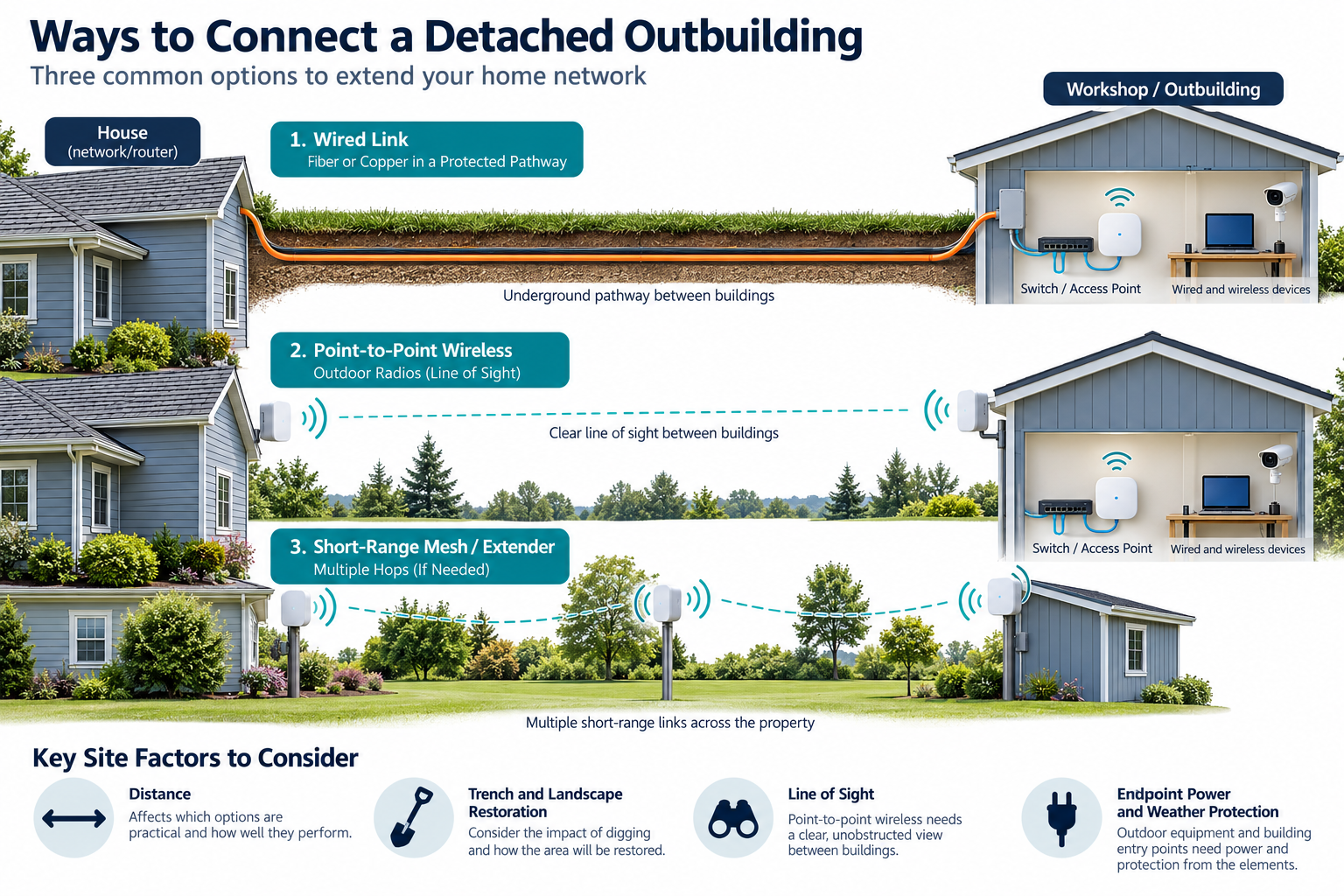
Main ways to connect buildings
| Approach | Typical scope |
|---|---|
| Fiber link | Fiber route, conduit or pathway, terminations, transceivers or fiber switches, endpoint network |
| Copper Ethernet | Outdoor-rated or protected cable, conduit, terminations, switches, and testing where technically suitable |
| Point-to-point wireless bridge | Two radios, mounting, clear path, power, alignment, configuration, and weather protection |
| Wi-Fi extender or mesh node | Lower-scope option when the distance and building materials permit, with less predictable performance |
No approach is automatically right. A wireless bridge may avoid excavation but needs a usable line of sight and power. Fiber may provide a durable backbone but requires more hardware and specialist work. Copper may be simple on a short protected route but needs appropriate design for the environment.
Wired and fiber options
A buried route may include trenching, conduit, pull string, cable, warning or protection measures as appropriate, building entries, sealing, termination, testing, and landscape or paving restoration. The network contractor may not own all site work, so the quote should identify who does excavation and repair.
Fiber can be useful for a backbone between buildings or where the network design calls for it. It usually transitions to copper or Wi-Fi at the outbuilding through a switch or media converter. Include endpoint equipment, enclosure, power, and documentation.
Copper Ethernet may be economical for a short path when the cable, pathway, and inter-building design are appropriate. Do not assume that indoor cable, an unprotected direct burial, or a casual extension is suitable for the property. Outdoor cable and electrical-isolation questions require appropriate technical and local guidance.
Wireless bridge option
A point-to-point wireless bridge can avoid trenching when the two buildings have a clear, stable line of sight. The project may need radios, mounting poles or brackets, network switches, power injectors or PoE, weather protection, alignment, configuration, and a test of the final throughput and stability.
Trees, terrain, roofs, seasonal foliage, metal siding, distance, and future construction can change the result. A bridge that works during an initial visit may need a different mounting location or may not be suitable if the path is obstructed. Ask whether the quote includes a site survey and what happens if the line of sight is inadequate.
An ordinary mesh node is not automatically a wireless bridge. It may be designed for shorter indoor paths and may not provide the same management or reliability. Compare the actual equipment and intended use.
Endpoint equipment
The outbuilding may need a switch, wired access point, camera, alarm hub, printer, or automation controller. A remote access point may require PoE, and a camera may need storage or a recorder at the main house. Include the local network enclosure, cables, mounting, configuration, and service access.
If the building has poor Wi-Fi or many connected devices, a wired endpoint access point may be more useful than a basic extender. If it is a gate or camera location, the control or video scope may be separate from the building network.
Distance and site-work cost drivers
Cost rises with:
- distance between structures;
- trenching, rock, roots, landscaping, pavement, or drainage;
- conduit length and difficult bends;
- building entry and weather sealing;
- line-of-sight limitations for wireless;
- endpoint power and equipment location;
- fiber termination or specialized testing;
- remote or rural travel;
- coordination with electrical, gate, or site contractors.
Power and network are related but separate. A detached building may need electrical service, grounding, disconnects, or a new circuit, but those are outside the low-voltage network scope. Do not let a network price silently include line-voltage work.
Safety and inter-building boundaries
Inter-building cable, conduit, grounding, lightning, electrical isolation, and outdoor installation can have safety consequences. This guide does not prescribe a universal method or local code result. Use qualified professionals and applicable authoritative requirements for the site.
The network connection should be documented separately from the building’s electrical service. If a gate, camera, or access-control system is added, identify its release, operator, power, and physical-construction boundaries.
Choosing the economical approach
Choose a wireless bridge when trenching is expensive or disruptive and the line of sight and power are suitable. Choose fiber when a durable backbone, distance, building separation, or future network plan justifies the equipment and specialist labor. Choose copper when a short protected route is technically appropriate and the cost and serviceability are attractive.
The cheapest hardware is not the cheapest installed system if it requires repeat visits, poor coverage, or replacement after the first seasonal change. Compare installation, performance objective, future maintenance, and five-year support.
U.S. and Canadian budgeting
For a Canadian project, request a quote from an installer serving the property’s area using the same scope: distance, trench or pathway, fiber or wireless bridge, endpoint equipment, weather protection, and commissioning. Ask the quote to separate equipment and labor, applicable site or restoration work, configuration or testing, recurring terms, taxes, and exclusions. Do not derive a Canadian amount by converting a U.S. band.
What the quote should state
Ask for:
- connection method and reason;
- distance, route, line-of-sight, and site assumptions;
- trenching, conduit, restoration, and building-entry responsibilities;
- fiber, copper, bridge, switch, access-point, and power equipment;
- weather protection, testing, alignment, and documentation;
- electrical, gate, physical-building, and network boundaries;
- support, warranty, and future expansion.
Planning the site before choosing hardware
Walk the route and record building locations, trees, grades, pavement, landscaping, likely trench access, line of sight, and where power and network equipment can be protected. A networking quote that does not identify those conditions is incomplete for a detached-building project.
Ask for a wired and wireless option when both are plausible. The comparison should show current installation, site restoration, endpoint equipment, weather exposure, testing, and future service. Decide who owns trenching, conduit, electrical work, building entry, and landscape repair before the work starts.
Matching the link to the use
List the outbuilding’s actual uses before choosing a connection. A workshop that only needs occasional internet access may need less than a guesthouse with video calls, a camera system, access control, and several wired devices. A gate or driveway camera may need low-latency control and a weather-protected endpoint. A seasonal building may need a path that can be inspected and restarted after a long outage.
The endpoint design matters as much as the link. A fiber or wireless bridge may terminate at a small switch, a wired access point, or a network enclosure. Include the cable from that endpoint to the devices that matter. Otherwise the quote may deliver connectivity to the building but still leave poor coverage inside it.
Ask for a handoff map showing the house port, route, bridge or fiber equipment, outbuilding port, power source, and restart procedure. Record which services fail if the main-house network, local power, or a cloud account is unavailable.
Planning for future service
Ask how the link will be diagnosed if the outbuilding goes offline. A visible equipment label, a network map, a restart procedure, and a test result can avoid a long travel charge. If the route is buried, photograph and map it before restoration. If the path is wireless, record mounting points and alignment assumptions so vegetation or a future roof does not erase the design history.
Before approving the route
Ask who will repair a trench, conduit, building entry, or landscape surface if the network contractor does not own that work. Confirm the endpoint can be powered and serviced in every season. A connection that reaches the outbuilding but cannot be restarted or repaired remotely may not meet the actual property need.
Key points
- Site work and building access often cost more than network hardware.
- Fiber, copper, wireless bridges, and mesh nodes are different project approaches.
- Distance, line of sight, trenching, conduit, power, and weather drive cost.
- Electrical, gate, and physical construction scopes must be separated.
- Choose the connection the site can maintain, not merely the device with the lowest shelf price.
Final quote checkpoint
Before comparing copper, fiber, and wireless bridge options, map the distance, grade, trench, conduit, building entries, power sources, and expected devices at both ends. Ask whether the proposed link crosses between electrical systems or exposed areas and what grounding, surge, bonding, weather, and lightning-protection measures apply. Separate network equipment from excavation, electrical, landscape, and building repair. Confirm the endpoint speed, spare capacity, service access, and behavior during a power or internet outage. The handoff should include route photos, conduit or cable records, port labels, equipment models, test results, and owner credentials. A lower upfront route may become expensive if it cannot be serviced or expanded when the outbuilding’s use changes.