
In U.S. planning examples, installing one smart lock may cost about $200–$600 for a common retrofit device and basic setup. A full lockset replacement, door preparation, strike adjustment, rekeying, hub or bridge, difficult access, or broader integration can bring the project to $600–$1,500 per opening. Multiple compatible doors may reduce repeated setup labor but multiply hardware and battery service.
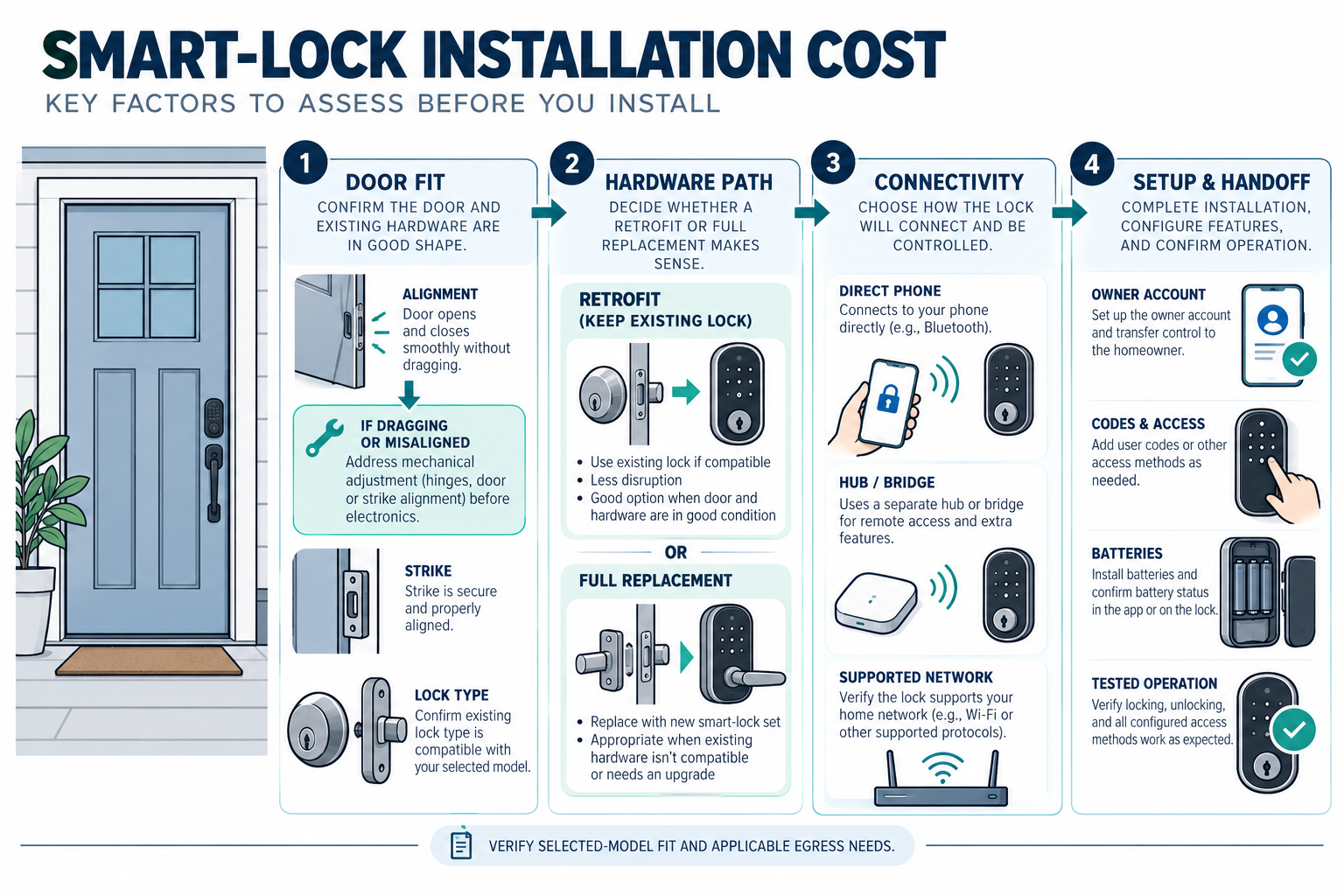
The largest cost question is whether the selected lock fits the existing door and latch without substantial preparation. A connected lock is still a mechanical door assembly. If the door drags, the strike is misaligned, or the frame is damaged, the smart portion may not be the main repair.
What smart-lock installation includes
A complete installation may include:
- the lock, interior mechanism, exterior keypad or reader, and mounting hardware;
- removal of the existing deadbolt or lockset;
- door and strike inspection;
- drilling, boring, reinforcement, or alignment work;
- rekeying or replacement of the cylinder;
- batteries and battery-cover access;
- Bluetooth, Wi-Fi, Thread, Zigbee, Z-Wave, or another supported connection path;
- hub or bridge installation;
- app enrollment, user codes, schedules, and automation;
- testing, owner handoff, and documentation.
An installer may price the device separately from labor. Ask whether the quote assumes a standard residential deadbolt, an existing compatible bore, a single opening, and no frame repair. Those assumptions can make a large difference.
Retrofit versus full replacement
A retrofit smart lock replaces or adds to part of the interior mechanism while preserving an exterior cylinder, key, or existing lock body. It can be economical when the door and deadbolt are in good condition and the manufacturer supports that exact configuration.
A full replacement removes more of the lockset and may provide a new exterior keypad, lever, cylinder, latch, or strike. It can offer a cleaner package but may require door preparation and alignment. A decorative or unusual lockset, multipoint door, narrow stile, mortise lock, or older frame may need a product-specific assessment.
Do not assume a product designed for a standard deadbolt fits a mortise, multipoint, fire-rated, or shared-property door. Compatibility claims should come from current manufacturer documentation for the actual opening. If a door is part of a rental, condo, co-op, or common-property system, permission and responsibility may matter before installation.
Door condition and preparation
Door condition is often the most important labor variable. A good lock needs the door to close, latch, and align without excessive force. A technician may adjust hinges, the strike, the latch, or the frame. A damaged or distorted door may need carpentry or replacement before a smart lock is appropriate.
Preparation cost can include filling an old opening, drilling a different bore, modifying the strike, reinforcing the frame, or adapting trim. Ask that door repair and lock installation be separated. A lock quote that assumes perfect alignment is provisional when the door has already shown sticking or incomplete latching.
Outdoor exposure, a gate, a high-security door, or a remote outbuilding can introduce weather, power, and connectivity considerations. A smart lock at a detached building may need a different network or access-control plan from a single front-door retrofit.
Connectivity and hubs
Some locks communicate directly with a phone at close range. Others need a Wi-Fi, Thread, Zigbee, Z-Wave, or proprietary hub for remote access and automation. Connectivity changes equipment, setup, and service cost.
The Connectivity Standards Alliance describes Matter as an open protocol that can use Bluetooth Low Energy for setup and Wi-Fi, Thread, or Ethernet for network connectivity. It also notes that existing Zigbee or Z-Wave products may participate through bridges and that implementation depends on the product. A Matter label therefore does not guarantee that every lock, feature, or automation transfers across platforms.
Ask which functions work locally, which require a bridge or cloud account, and what happens if the network is unavailable. Record the hub model, supported lock models, account owner, and replacement path. These details are more useful than a generic promise of interoperability.
Batteries and maintenance
Smart locks commonly require batteries at the door. Battery life depends on the model, use, radio path, temperature, and settings. A battery warning is only useful if the owner receives it and can reach the lock. Include battery replacement and emergency access planning in the ownership decision.
The mechanical parts also require attention. A lock may need adjustment when a door settles, weather changes, or the frame moves. If the lock is tied to a larger automation system, a controller or bridge can also fail or become unsupported. Ask who services the mechanical opening and who services the connected system.
Professional setup and integrations
Basic setup may include app enrollment, owner account, user codes, temporary credentials, schedules, and a test of locking and unlocking. Integration with a doorbell, alarm, intercom, property-management system, or whole-home automation adds programming and compatibility work.
Ask the installer to prove the intended fail-safe behavior and owner access without relying on a generalized claim about the product. Do not publish or use a smart lock as a substitute for an exit or fire-safety assessment. UL guidance explains that access-control applications can include electric locking hardware and must preserve free and unobstructed egress; the appropriate product listing and local requirements must be checked for the actual door.
This guide does not provide instructions for defeating, bypassing, or modifying a lock’s security or egress function. A qualified professional should handle consequential changes.
One door versus multiple doors
One lock can be a simple replacement. Multiple doors add hardware, installation, user-management, testing, and future battery cost. A coordinated system may justify a hub or centralized controller, but it can also move the project toward residential electronic access control.
Centralized access control is a different decision when a homeowner needs multiple credential types, a central event log, controlled service access, electric strikes, readers, or coordinated doors. Do not hide that system inside a single smart-lock estimate.
U.S. and Canadian cost boundaries
For a Canadian project, request a quote from an installer serving the property’s area using the same scope: lock hardware, door preparation, strike adjustment, rekeying, hubs, user setup, and integration. Ask the quote to separate equipment and labor, applicable site or restoration work, configuration or testing, recurring terms, taxes, and exclusions. Do not derive a Canadian amount by converting a U.S. band.
For fire-rated doors, egress doors, rentals, shared buildings, or doors serving multiple occupants, verify applicable requirements and permission before choosing equipment. Product compatibility and local responsibility cannot be inferred from the lock’s retail packaging.
Questions before approving
Ask:
- Is this a retrofit or full lock replacement?
- Does the actual door, bore, latch, frame, and strike match the manufacturer’s compatibility list?
- Is alignment or carpentry included?
- Is rekeying included, and who controls the keys?
- What hub, bridge, network, or cloud account is required?
- Which functions work when the network or cloud service is unavailable?
- Who owns the administrator account and recovery method?
- What battery access, warning, and emergency-entry assumptions apply?
- Is this still one-door work, or is centralized access control the better scope?
- Has a qualified professional checked any egress, fire-rating, rental, or shared-property issue?
A practical lock decision
Start with the door, not the app. Check whether the door closes and latches smoothly, whether the deadbolt aligns with the strike, and whether the existing hardware is a standard configuration supported by the selected product. Fixing a dragging door or damaged frame may be necessary before any connected lock can work reliably.
Next define the access behavior: one owner code, temporary service codes, remote unlock, scheduled access, audit history, or integration with an alarm or intercom. Each added behavior can require a bridge, subscription, programming, and a clearer transfer plan. If the homeowner only needs one connected opening, centralized access control may add unnecessary cost. If several doors and user rules are involved, a collection of unrelated smart locks may create higher future service and account complexity.
Setting a useful stopping point
Do not add centralized software, extra bridges, or multiple lock types unless they solve a real access-management need. A simple, documented lock on a sound door can be a better value than a larger system that the homeowner cannot maintain or transfer.
Key points
- A standard, aligned door can keep smart-lock installation near the lower range; preparation and compatibility can dominate the total.
- Retrofit and full-replacement locks are different scopes.
- Hubs, bridges, cloud accounts, batteries, and integrations add ownership cost.
- Matter or another protocol does not guarantee universal feature compatibility.
- Keep mechanical door work and consequential access-control requirements visible in the quote.
Final quote checkpoint
Before selecting a smart lock, verify the door type, bore dimensions, backset, handing, strike alignment, deadbolt condition, trim clearance, and whether a key or thumb turn must remain. Ask the installer to separate mechanical preparation from the electronic lock, hub or bridge, batteries, app setup, credential enrollment, and future service. Confirm how the lock behaves during a dead battery, network outage, account loss, or failed integration, and keep a reliable local entry method. If the door is part of an egress or shared access route, seek the applicable professional or local review. The handoff should include the model, recovery method, owner account, user-management instructions, battery schedule, and tested lock behavior.